Categories:
Android (32)
Apple (iPhone) (829)
Apps (26)
BlackBerry (3)
General (438)
HTC (6)
Huawei (83)
LG (43)
Motorola (50)
Nokia (4)
Palm (10)
Samsung (139)
Sony (1)
Technology (17)
Windows Phone (209)
ZTE (5)
Online Tools:
Tutorial Collections:
Other Resources:
Open and Read Books on iBooks
How to open and read books on iBooks? I have purchased some books from the book store.
✍: FYIcenter.com
You can follow this tutorial to open and read books on iBooks.
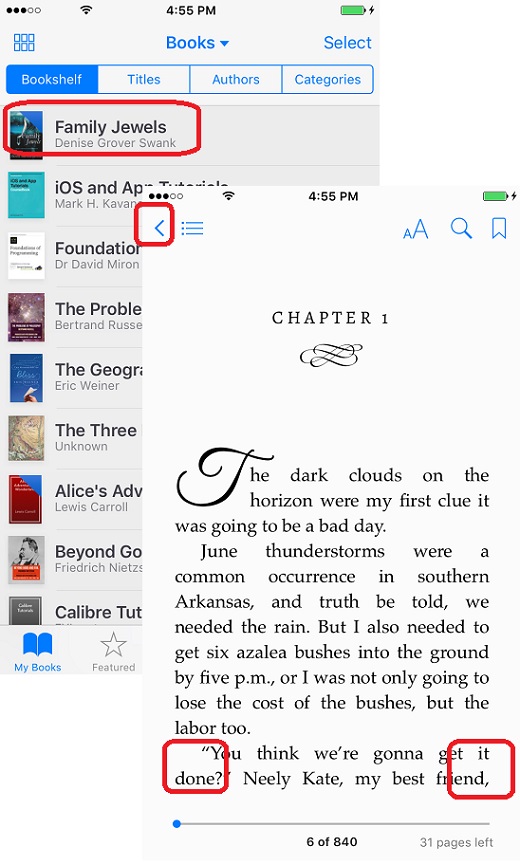
1. Launch iBooks on your iPhone. You see your book library list.
2. Tap on the book you want to open to read. You see the book opening up.
3. Tap on the right side of the screen to go to the next page.
4. Tap on the left side of the screen to go to the previous page.
5. Tap on "<" icon to quit reading.
The picture below shows you how to open and read books on iBooks:
2018-06-12, ∼2770🔥, 0💬
Popular Posts:
When was Samsung Galaxy Note II phone first released? How does Samsung Galaxy Note II phone look lik...
When was Samsung Galaxy S4 phone first released? How does Samsung Samsung Galaxy S4 phone look like?...
Where to find answers to frequently asked questions on Huawei Phones? I want to know more details ab...
What are security settings supported on Motorola phone? You can go to "Settings > Security" t...
What are iPhone 5S model numbers? I want to check my iPhone model to ensure I have an iPhone 5S. You...