Connect to Personal Hotspot with Wi-Fi from macOS
How to connect to a Personal Hotspot with Wi-Fi from my macOS computer? My friend is offering a Personal Hotspot connection on his iPhone.
✍: FYIcenter.com
 Here are the correct steps to connect to a Personal Hotspot with Wi-Fi from your macOS computer.
1. Make sure that your friend has turned on Personal Hotspot and Wi-Fi on his iPhone.
2. Make sure that your friend gives you his iPhone name and the Wi-Fi password.
3. Turn on Wi-Fi on your macOS computer, in "Settings > Networks", and move closer to your friend. You should see your friend's iPhone is listed in the Wi-Fi list.
4. Ask your friend to turn off Personal Hotspot and turn on again, if you don't see his iPhone list on your Wi-Fi list.
5. Select friend's iPhone from the Wi-Fi list. And enter the password given to you by your friend. You should see the Internet connection with the hotspot icon on your macOS computer. Enjoy surfing the Internet.
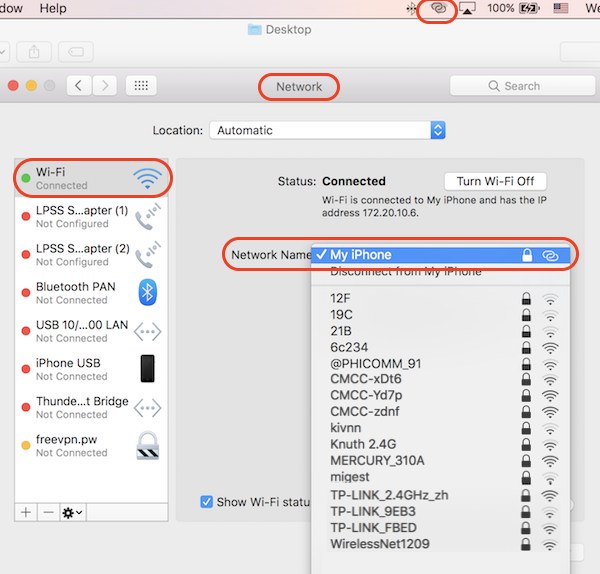
The picture below shows you how to connect to a Personal Hotspot with Wi-Fi from your macOS computer.
⇒ Connect to Personal Hotspot with Bluetooth from macOS
⇐ Turn On/Off Personal Hotspot on iPhone
2020-05-29, ∼2654🔥, 0💬
Related Topics: