Send File over Bluetooth - macOS to iPhone
How to send files over a Bluetooth connection from my macOS computer to my iPhone? I am getting an error.
✍: FYIcenter.com
 Sending files over a Bluetooth connection from your macOS computer to your iPhone
is not possible.
Sending files over a Bluetooth connection from your macOS computer to your iPhone
is not possible.
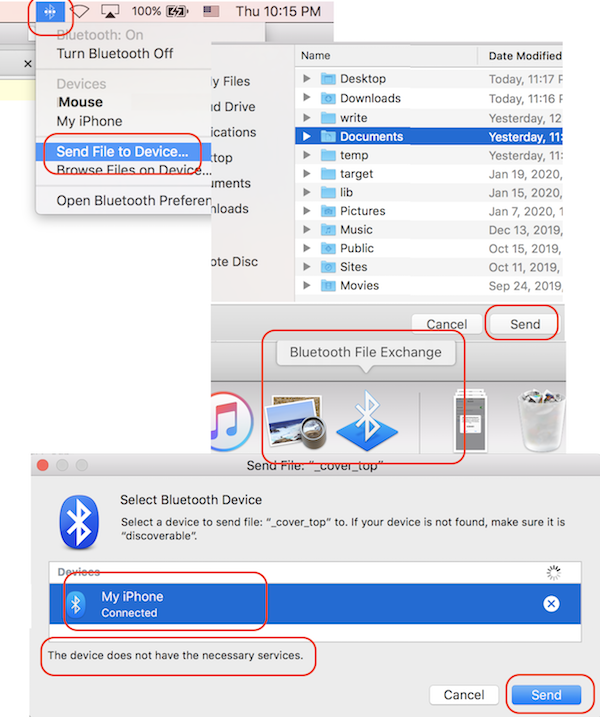
If you try it, you will see the error: "The device does not have the necessary services."
1. Create a Bluetooth connection between your iPhone and your macOS.
2. On your macOS, click on the Bluetooth icon on the top menu bar. You see the Bluetooth menu.
3. Click "Send File to Device" from the menu. You see the "Bluetooth File Exchange" app running.
4. Browse and select the file you want to send. And click "Send" button. You see the "Select Bluetooth Device" dialog box displayed.
5. Select the connected iPhone device, My iPhone. And click "Send" button. You see an error message displayed near the bottom of the dialog box.
The device does not have the necessary services.
Too bad, iPhone does not support file exchange over Bluetooth connections.
The picture below shows you the error when sending files over a Bluetooth connection from macOS computer to iPhone:
⇒ Browse iPhone Files over Bluetooth from macOS
2020-03-15, ∼6020🔥, 0💬
Related Topics:
