Check for iTunes Updates on Mac
Q
How to check for iTunes updates on Mac?
✍: FYIcenter.com
A
 If you installed iTunes more than a few months ago, your iTunes version
is probably outdated. You can following this tutorial to check for iTunes
updates.
If you installed iTunes more than a few months ago, your iTunes version
is probably outdated. You can following this tutorial to check for iTunes
updates.
1. Make sure your Mac is connected to the Internet. And run iTunes.
2. Click "Help > Check for Updates" menu.
3. Wait for iTunes to contact Apple Website.
4. Read the message returned from iTunes. For example:
A new version of iTunes (12.9.3) is available.
Would you like to download it now?
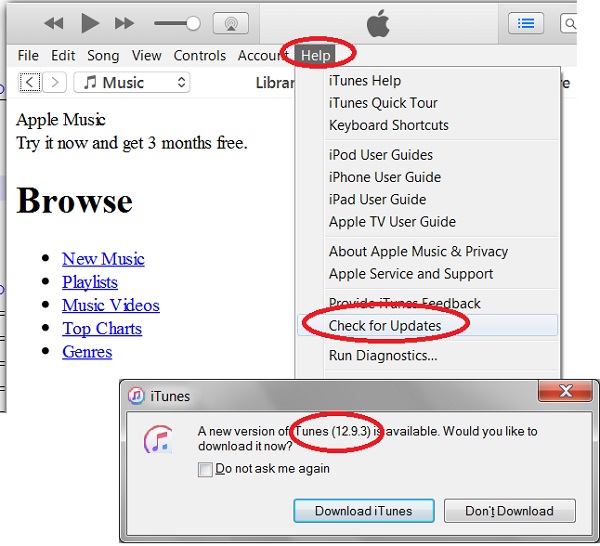
You should follow the next tutorial to download and upgrade iTunes on your PC.
⇒ Download and Install iTunes Update on Mac
⇐ Start iTunes for Mac First Time
2021-04-04, ∼2254🔥, 0💬
Related Topics:

