Categories:
Android (32)
Apple (iPhone) (829)
Apps (26)
BlackBerry (3)
General (438)
HTC (6)
Huawei (83)
LG (43)
Motorola (50)
Nokia (4)
Palm (10)
Samsung (139)
Sony (1)
Technology (17)
Windows Phone (209)
ZTE (5)
Online Tools:
Tutorial Collections:
Other Resources:
Add Music Files to iTunes Library on Mac
How to add a single music file to iTunes music library on Mac?
✍: FYIcenter.com
You can follow this tutorial to add a single music file to
iTunes music library.
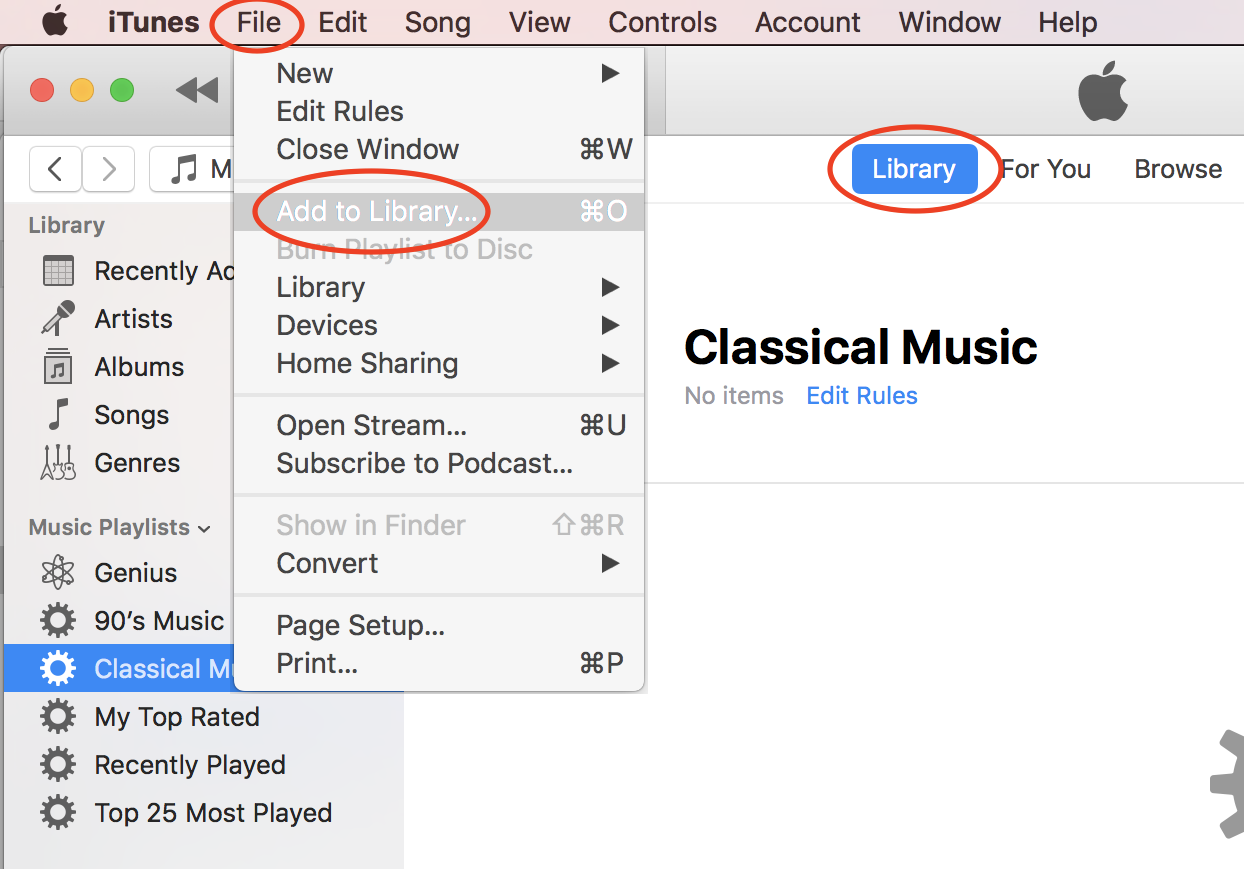
1. Start iTunes on your Mac computer.
2. Click "File > Add to Library..." in the menu. You see a file browser displayed.
3. Browse the hard disk of your computer to locate the music file.
4. Select the music file and click "Open". The selected file will be added to iTune music library.
⇒ Add Music Folder to iTunes Library on Mac
⇐ Downloaded Free Music from Amazon
2020-10-20, ∼1833🔥, 0💬
Popular Posts:
Is Google following you? Google, the Internet giant's latest mobile operating system tracks user's l...
How to Take Panorama Picture with my LG phone camera? You can follow this tutorial to Take Panorama ...
When was ZTE Avail 2 phone first released? How does ZTE Avail 2 phone look like? What are the main t...
Where to lookup for the SIM Card Issuer company and contact information? If you have the country/reg...
How to use iPhone camera built-in color filter "Noir" to take black and white photos? You can follow...