View and Edit Music File Properties on Mac
How to view and edit music file properties with iTunes on Mac?
✍: FYIcenter.com
 When a music file is added to the iTunes library, its properties will be extracted
by iTunes to build an entry in the database. Those properties includes:
Title, Artist, Album, Composer, Genre, Year, Track, etc.
When a music file is added to the iTunes library, its properties will be extracted
by iTunes to build an entry in the database. Those properties includes:
Title, Artist, Album, Composer, Genre, Year, Track, etc.
Here is you can view and edit music file properties with iTunes on Mac.
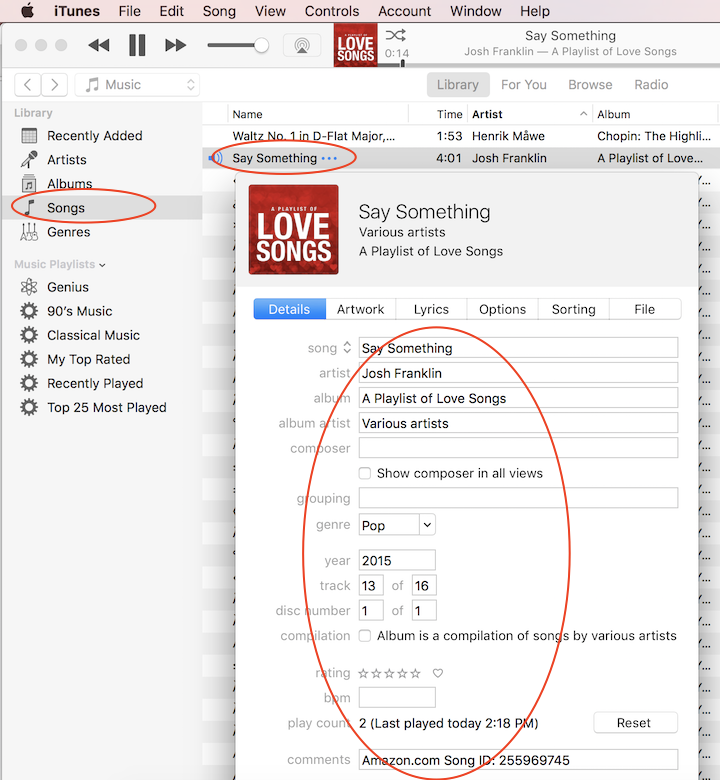
1. Run iTunes and click "Songs". You see a list of songs in the library.
2. Control-click on a song like "Say Something". And select "Get Info". You see a list of properties associated with the music file.
3. View and change any properties. For example:
song: Say Something
artist: Josh Franklin
album: A playlist of Love Songs
album artist: Various artists
composer:
grouping:
genre: Pop
year: 2015
track: 13 of 16
disk number: 1 of 1
compilation:
rating:
bpm:
play count:
comment:
⇒ Copy Music File Out from iTunes Library on Mac
⇐ Add Music Folder to iTunes Library on Mac
2020-10-10, ∼4339🔥, 0💬
Related Topics:
