Record Music with QuickTime Player on Mac
How to record music on my Mac computer? I want to sing a song and record it.
✍: FYIcenter.com
 If you want to record your own song, you can follow this tutorial using the internal microphone
on your Mac computer.
If you want to record your own song, you can follow this tutorial using the internal microphone
on your Mac computer.
1. Start "Application > QuickTime Player".
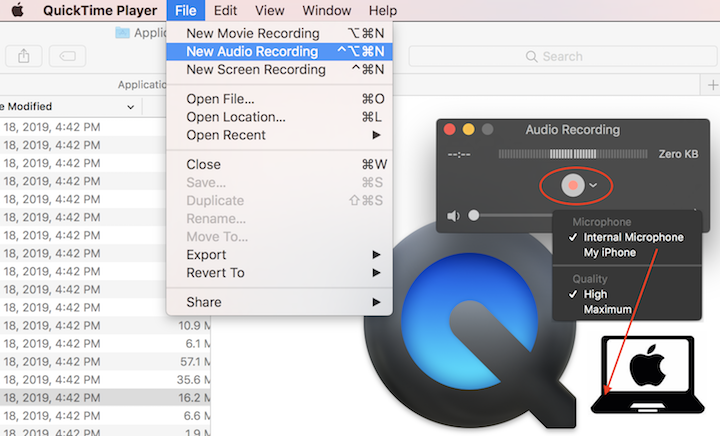
2. Select "File > New Audio Recording" in the menu. You see a small Audio Recording window.
3. Click the arrow next to the recording button. You see "Internal Microphohe" cheched and "(Quality) High" checked.
4. Clear your voice and be ready to sing.
5. Click the recording button and start to sing. Make sure you sing towards the location of the internal microphone (near the top left corner of your keyboard) on your Mac computer.
6. Click the recording button again to stop recording.
7. Select "File > Save" in the menu to save the recording as a music file like ~/temp/my-song.m4a. Note that QuickTime Player saves the file in .m4a (MPEG-4 Audio) format.
You can also record music from your iPhone speaker. Just make sure to move the speaker close to the internal microphone, keeping a distance of 1 inch.
⇒ Record Music with External Microphone on Mac
⇐ iTunes Media Folder Settings on Mac
2020-09-30, ∼2622🔥, 0💬
Related Topics:

