Record Music with Voice Memos on iPhone
How to record music with my iPhone? I want to sing a song and record it.
✍: FYIcenter.com
 If you want to record your own song, you can follow this tutorial using the internal/external microphone
on your iPhone.
If you want to record your own song, you can follow this tutorial using the internal/external microphone
on your iPhone.
1. If you have external microphone (iPhone Earphone, for example), connect it to your iPhone.
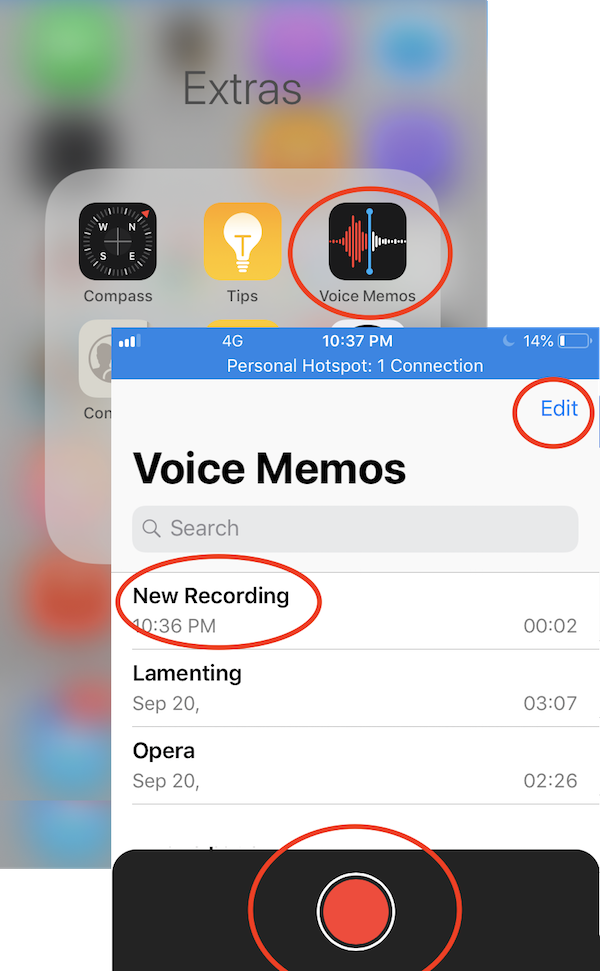
2. Tap on "Extras > Voice Memos".
3. Clear your voice and be ready to sing.
4. Click the red recording button and start to sing. Make sure you sing towards the microphone.
5. Click the recording button again to stop recording.
6. Tap "New Recording" name to give a better name for the recorded music.
You can record music from a computer speaker. Just make sure to move the speaker close to the microphone, keeping a distance of 1 inch.
You can also edit the recorded music by tapping "Edit". See the next tutorial.
⇒ Edit Recorded Music with Voice Memos on iPhone
⇐ iPhone Music Downloaded Music
2020-09-30, ∼2797🔥, 0💬
Related Topics:

