Edit Recorded Music with Voice Memos on iPhone
How to edit music recorded with Voice Memos on my iPhone? I want to trim some parts of the music.
✍: FYIcenter.com
 If you want to do some small editing on your own recorded song on your iPhone,
you can follow this tutorial.
If you want to do some small editing on your own recorded song on your iPhone,
you can follow this tutorial.
1. Tap on "Extras > Voice Memos". You see a list of songs recorded previously.
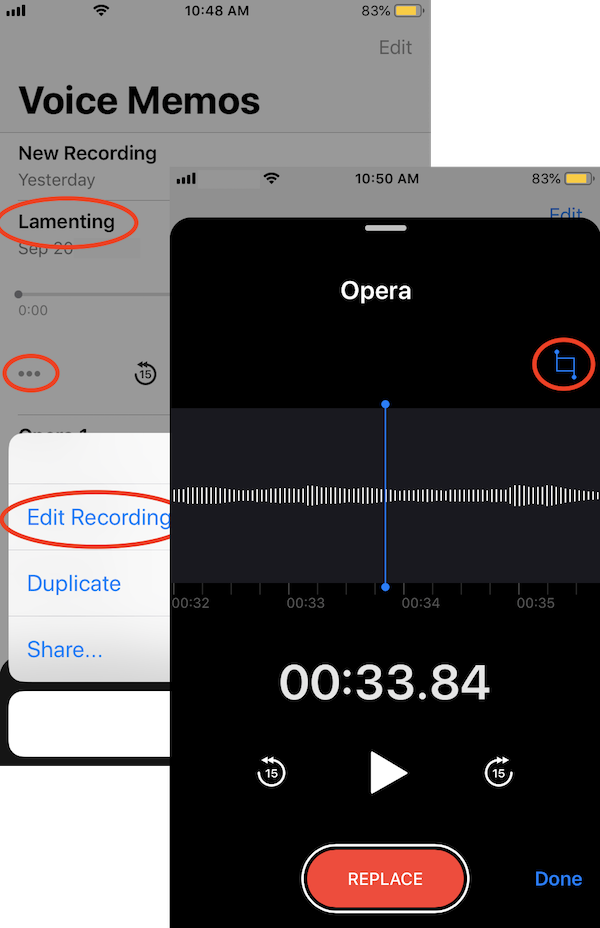
2. Tap on the music you want to edit. It opens with play and option icons.
3. Tap on the option (...) icon. You see the "Edit Recording" option.
4. Tap on "Edit Recording". You see the edit screen.
5. Tap on the trim icon near top right corner. You see the trim screen.
6. Move the trim frame to locat the section of music you want to keep or trim off.
7. Tap on "Trim" or "Delete" to make the change.
You can save a copy of the edited music to iPhone Files or share it with other App. See next tutorial.
⇒ Share Recorded Music with Voice Memos on iPhone
⇐ Record Music with Voice Memos on iPhone
2020-09-30, ∼2081🔥, 0💬
Related Topics:

