Smart Switch - Transfer Data between Samsung Phones
How to transfer data from another Samsung Galaxy Phone to my Samsung phone with Smart Switch?
✍: FYIcenter.com
 If you want to transfer data from your old Galaxy phone or your friend's Galaxy phone,
you can use Smart Switch with a Wi-Fi connection as shown below:
If you want to transfer data from your old Galaxy phone or your friend's Galaxy phone,
you can use Smart Switch with a Wi-Fi connection as shown below:
1. Make sure that both Samsung phones have Smart Switch installed.
2. Make sure that both Samsung phones are connected to the same Wi-Fi network, and disconnected to any computers.
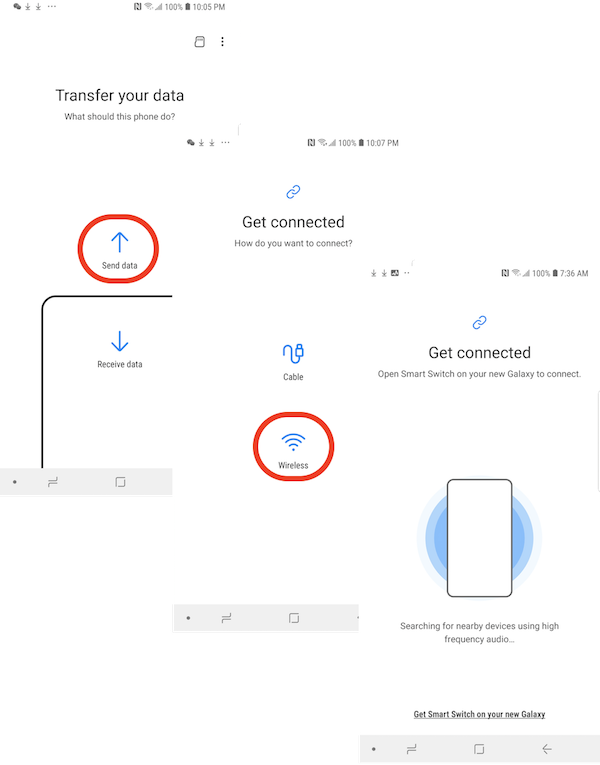
3. On sending phone, referred as the old Galaxy:
- Start Smart Switch. You see the "Transfer your data" screen.
- Tap "Send data". You see the "Get connected" screen.
- Tap "Wireless". You see a message "Open Smart Switch on your new Galaxy to connect".
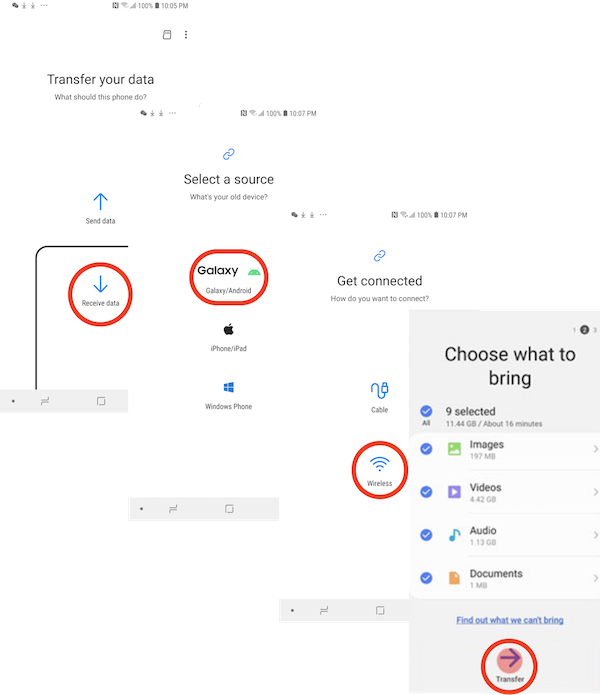
3. On receiving phone, referred as the new Galaxy:
- Start Smart Switch. You see the "Transfer your data" screen.
- Tap "Receive data". You see the "Select a source" screen.
- Tap "Galaxy/Android". You see the "Get connected" screen.
- Tap "Wireless". You see a content type list, if it connected ok with the sending phone.
4. Tap "ALLOW", if you are prompted for confirmation on the sending or receiving phone during the connection step.
5. On receiving phone, select all data types and tap "Transfer" to initiate the transfer.
6. On sending phone, tap "Copy" to transfer files.
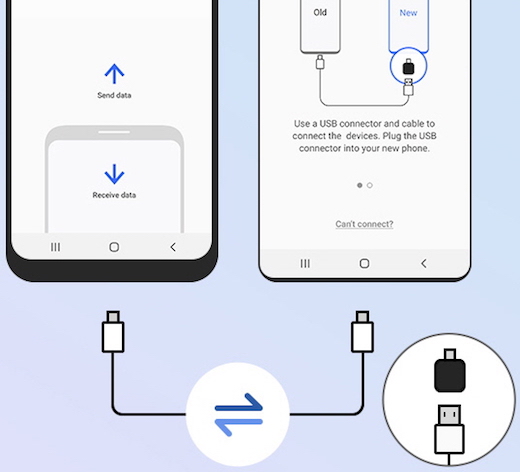
You can also use a USB cable connecting two Samsung phones to transfer data. But a USB adapter to connect two phones as shown below.
⇒ Smart Switch - Transfer Data from iPhone
⇐ What Is Samsung Smart Switch
2022-10-01, ∼3036🔥, 0💬
Related Topics:

