Bluetooth Connection - Mac to Galaxy
How to create a Bluetooth connection from my Mac computer to my Samsung Galaxy?
✍: FYIcenter.com
 Here are the correct steps to create a Bluetooth connection
from your Mac computer to your Samsung Galaxy.
Here are the correct steps to create a Bluetooth connection
from your Mac computer to your Samsung Galaxy.
1. On your Samsung Galaxy, turn on Bluetooth: "Settings > Connections > Bluetooth > On". And set it as discoverable.
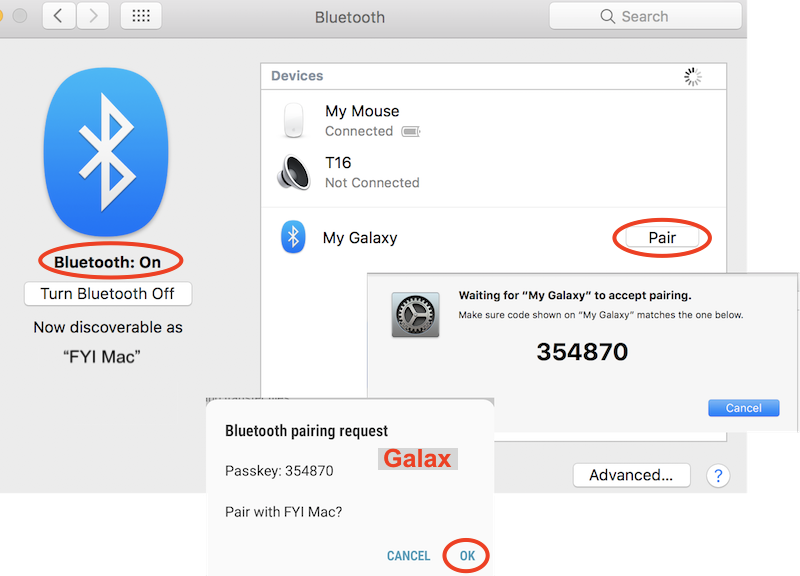
2. On your Mac computer, go to "System Preferences > Bluetooth". And turn on "Bluetooth". You should see your Samsung Galaxy being discovered and displayed like: My Galaxy. It may take few seconds to discover it.
3. Click "Pair" next to your Samsung Galaxy name. This sends a pairing request to your Samsung Galaxy, and displays a pairing code:
Waiting for "My Galaxy" to accept pairing
Make sure code shown on "My Samsung Galaxy" matches the one blow:

354870
4. On your Samsung Galaxy, you see a message box:
Bluetooth Pairing Request

Passkey: 354870

Pair with FYI Mac?
5. Click "OK" on the message box on Galaxy. This sends a pairing accepted response back to your Mac.
6. On your Mac, you see your Samsung Galaxy, My Galaxy, become paired and connected. Enjoy the Bluetooth connection!
Once connected, apps on your Samsung Galaxy or Mac can use this connection to perform special functions, like play music from each others music library, or transfer files.
The picture below shows you how to create a Bluetooth connection from your Samsung Galaxy to your Mac:
⇒ Send File over Bluetooth - Mac to Galaxy
⇐ Bluetooth Connection - Galaxy to Mac
2022-11-30, ∼2075🔥, 0💬
Related Topics:
 USE PHONE NUMBER TO GET IMEI
I’m trying to get a IMEI number using a telephone number how do I do that can you help me? 2022-12-03, ∼3261🔥, 1💬

