Send File over Bluetooth - Mac to Galaxy
How to send files over a Bluetooth connection from my Mac computer to my Samsung Galaxy?
✍: FYIcenter.com
 Sending files over a Bluetooth connection from your Mac computer to your Samsung Galaxy
is easy.
Sending files over a Bluetooth connection from your Mac computer to your Samsung Galaxy
is easy.
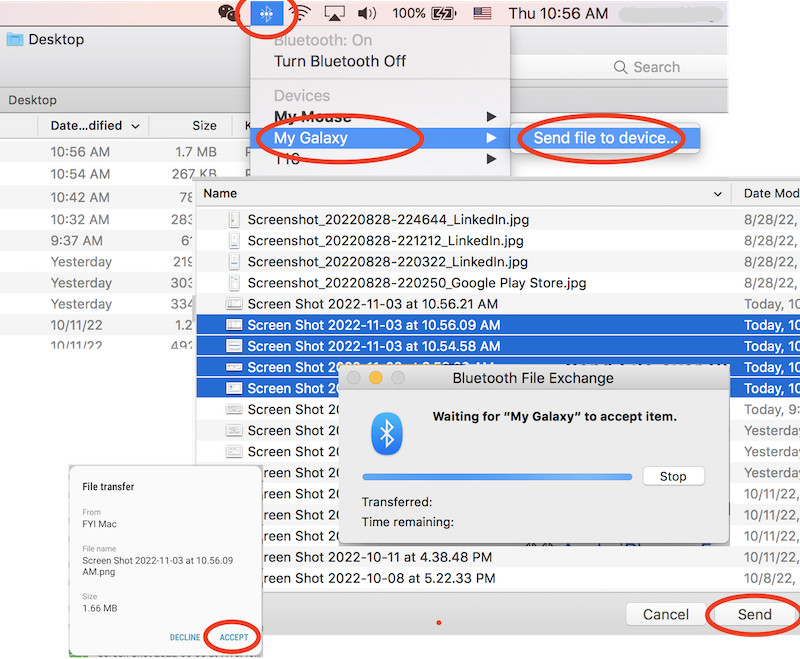
1. Create a Bluetooth connection between your Samsung Galaxy and your Mac computer as described in previous tutorials.
2. On your Mac, click on the Bluetooth icon on the top menu bar. You see the Bluetooth menu.
3. Click your paired Galaxy name "My Galaxy > Send file to device..." from the menu. You see the "Bluetooth File Exchange" app running.
4. Browse and select one or more files you want to send. And click "Send" button. You see a message "Waiting for "My Galaxy" to accept item.".
5. On you Galaxy, tap on "ACCEPT" on the "File Transfer" message box. You see file transfer progress reported on both Mac and Galaxy.
Once transfer is done, Galaxy will store pictures files under the "Gallery" app. Other files will be stored under the "My Files" app.
You can start the Bluetooth transfer process on Mac in two ways:
- Click "Bluetooth > {Paired Phone Name} > Send file to device" as described above.
- Click "Bluetooth > Send file to device" first, and select {Paired Phone Name} later.
The picture below shows you how to send files over Bluetooth from your Mac computer to your Samsung Galaxy:
⇒ Send File over Bluetooth - Galaxy to Mac Failed
⇐ Bluetooth Connection - Mac to Galaxy
2022-11-04, ∼2323🔥, 0💬
Related Topics:
 USE PHONE NUMBER TO GET IMEI
I’m trying to get a IMEI number using a telephone number how do I do that can you help me? 2022-12-03, ∼3296🔥, 1💬
