Edit Photos on macOS
How to edit photos on my macOS computer? I want to rotate the photo a little bit.
✍: FYIcenter.com
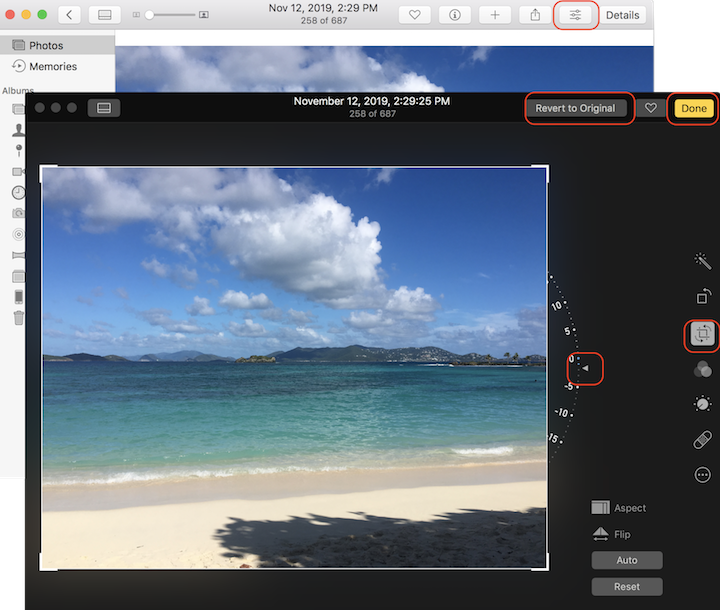
 Sometimes, you did not hold the camera straight up perfectly,
and you may want rotate the resulting photo a little to keep the water level straight
as shown in this example.
Sometimes, you did not hold the camera straight up perfectly,
and you may want rotate the resulting photo a little to keep the water level straight
as shown in this example.
1. Click "Photos" on the left menu. You see a list of all photos.
2. Find the photo you are interested in and double-click on it. You see the photo displayed in full size.
3. Click the "Edit" icon to enter the edit mode.
4. Click the "Crop" icon in on the edit menu to enter the crop mode.
5. Click and drag the crop handle to up or down to rotate the photo slightly until it's perfectly straight.
6. Click "Done" to save the changes.
7. If don't like the changes, you can edit it again and click "Revert to Original".
⇒ Export Photos out of Library on macOS
2023-04-06, ∼3037🔥, 0💬
Related Topics:

