Geotag Photos - Location Service for iPhone Camera
Where to turn on location service for my iPhone camera to help me tracking photos? I want my photos to have geotags so I know where I took them.
✍: FYIcenter.com
 Geotag adds a great value to your photos. It records the name of the place
where the photos were taken. It also records the precise geo location of the place
so that photos can be placed on a map to show you where those photos were taken.
Geotag adds a great value to your photos. It records the name of the place
where the photos were taken. It also records the precise geo location of the place
so that photos can be placed on a map to show you where those photos were taken.
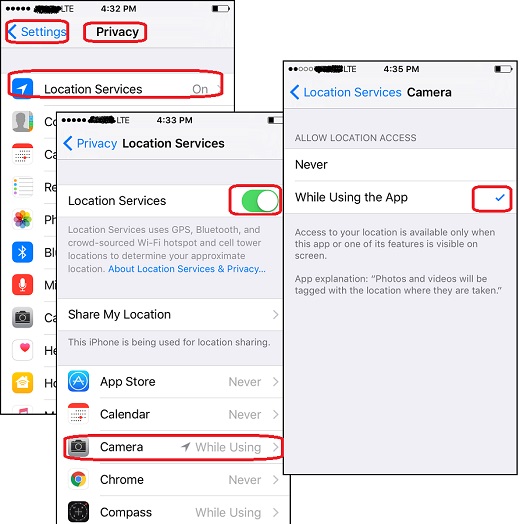
You can follow these steps to turn on the location service for your iPhone camera, so it can add geotags to photos:
1. Tap on "Settings > Privacy > Location Services". You see the "Location Services" screen.
2. Tap on "Location Services" switch to turn it on.
3. Tap on "Camera". You see the "Camera" screen.
4. Tap on "While Using the App" to make it selected. You see the following message displayed:
Access to your location is available only when this app or one of its
features is visible on screen.

App explanation: "Photos and videos will be tagged with the location
where they are taken.
5. Go take some photos now. Then go to Photos app and open one of the new photos. You see the location name is displayed on top of the photo.
The picture below shows you how to turn on the location service for your iPhone camera
to record geotags:
2017-09-20, ∼4373🔥, 0💬

