Adjust iPhone Camera Exposure Manually
How to adjust camera exposure manually when taking photos with my iPhone?
✍: FYIcenter.com
 When you taking photos with your iPhone, the camera will automatically
set the exposure time based on the lighting condition
on the subject in the center of the screen.
When you taking photos with your iPhone, the camera will automatically
set the exposure time based on the lighting condition
on the subject in the center of the screen.
In most cases, the auto-calculated exposure time will result good brightness quality on the subject you are interested. But sometimes, you do want to have a longer or shorter exposure time than the auto-calculated exposure time to generate better photos.
For example, taking person standing in a darker room next to a bright window, iPhone camera will give a longer exposure time so the person's face can be seen in the photo, but the background will be over-exposed.
To correct this problem, you can manually adjust to a shorter exposure time by following these steps:
1. Hold your iPhone camera still.
2. Tap on the screen where it has brighter light. The camera will adjust the exposure time based on the light condition of that spot. A small yellow box is displayed to show you the spot you tapped on. Tapping a brighter spot will make the camera to decrease exposure time. Tapping a brighter spot will make the camera to increase exposure time.
Tapping a spot on the screen will also make the camera to focus on that spot, which may not be the right spot you want to focus on.
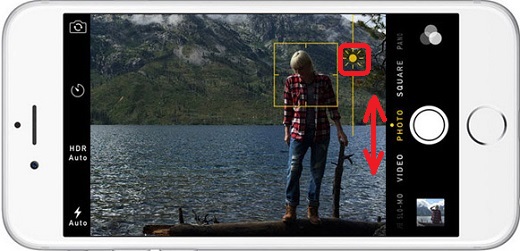
4. Tap on the spot where you want the camera to have a sharp focus on it. You see the small yellow box displayed to identify the focused spot. You also see the exposure adjustment icon, a tiny yellow sun icon, displayed next to the yellow box.
5. Swipe the screen up to move exposure icon up to increase exposure time. Or swipe the screen down to move exposure icon up to decrease exposure time. This will not change the camera focus setting.
6. Tap on the shutter icon to take the photo, when you get the perfect focus and exposure settings.
The picture below shows you how to adjust iPhone camera exposure time manually (source: mylio.com):
⇒ iPhone Camera Exposure and Focus Locking
2017-09-20, ∼3387🔥, 0💬

