Using Camera Self Timer on iPhone
How to use the camera self timer on my iPhone? I want to take a photo 10 seconds after I pressed the shutter.
✍: FYIcenter.com
 The self timer on your iPhone camera allows you to take photos
3 or 10 seconds after you pressed the shutter.
The self timer on your iPhone camera allows you to take photos
3 or 10 seconds after you pressed the shutter.
For example, if you are traveling by yourself, and to take a photo of yourself with a sunset background.
1. Mount your iPhone on a tripod and turn the iPhone camera to the sunset background.
2. Mark a position on ground where you will standing and adjust the tripod to ensure that position will be included in the photo.
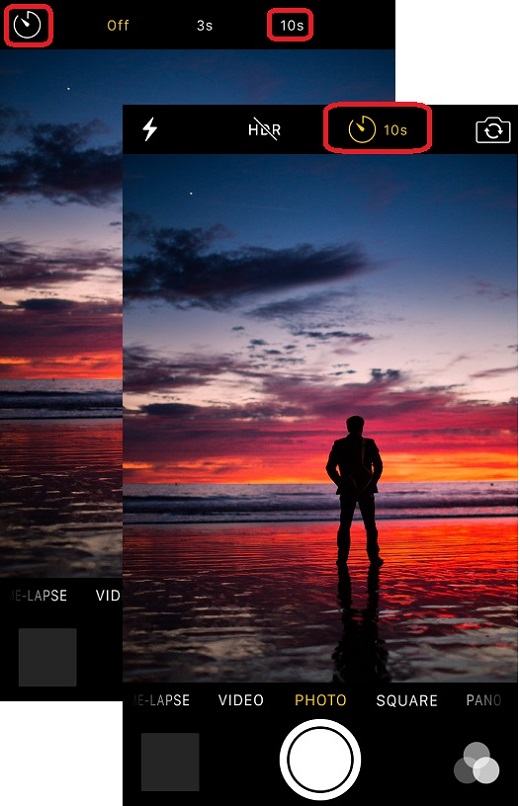
3. Tap on the Self Timer icon on top of the screen.
 You see 3 options: Off, 3s, and 10s.
4. Tap on "10s" to set the timer to 10 seconds.
5. Press the shutter icon. You see "10" displayed on the screen, then "9" one second later.
6. Go to the mark the position. Wait for the timer reaching 0 second. You will hear the shutter sound.
The picture below shows you how to use the camera self timer on your iPhone (source: photoncollective.com):
⇒ Taking 360-Degree Panorama Photos with iPhone
2017-05-05, ∼4616🔥, 0💬
Related Topics:

