Synchronize Photos on iPhone with iCloud Photo Library
How to synchronize Photos on iPhone with iCloud Photo Library?
✍: FYIcenter.com
 Synchronization of photos on your iPhone with your iCloud Photo Library
allows photos taken on iPhone to be automatically uploaded to iCloud Photo library
as backup copies and accessible by your other Apple devices.
Synchronization of photos on your iPhone with your iCloud Photo Library
allows photos taken on iPhone to be automatically uploaded to iCloud Photo library
as backup copies and accessible by your other Apple devices.
Synchronization also allows photos added to iCloud Photo Library from your other Apple devices to be automatically downloaded to your iPhone.
You can synchronize photos on iPhone with iCloud Photo Library using these steps:
1. Connect your iPhone to Internet with Wi-Fi. Note that iCloud Photo Library is not accessible without Wi-Fi.
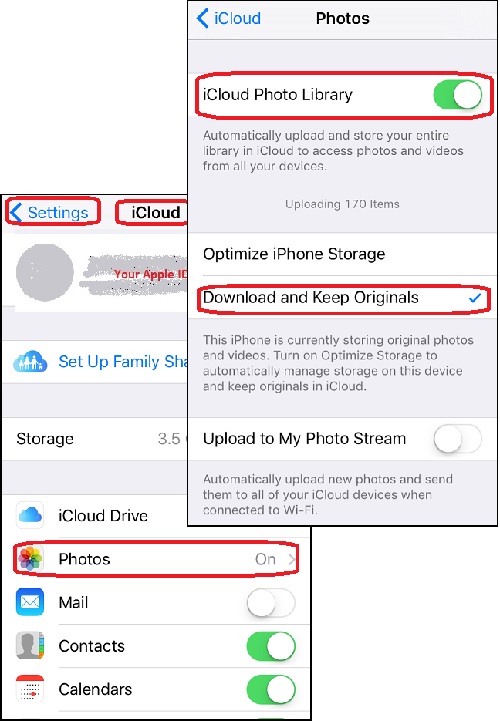
2. Tap on "Settings > iCloud". You see a list of iCloud functions.
3. Tap on the "Photos" switch to turn it on. Apple may ask you to enter your Apple ID and password to double check your identity.
4. Wait for the photos function to be turned on. You see the photos screen.
5. Tap on "iCloud Photo Library" switch to turn it on. It automatically upload and store your entire library in iCloud to access photos and videos from all your devices.
6. Wait for the "iCloud Photo Library" function to be turned on. You see a message like "Uploading 170 items", indicating that you have 170 new photos and videos that will be uploaded to iCloud Photo Library.
You also see 2 options on how photos will be synchronized between your iPhone and your iCloud Photo Library.
- Optimize iPhone Storage - Your iPhone will synchronize (download and upload) original photos and videos with iCloud Photos Library, and reduce their resolutions if your iPhone is running out of storage space. Original photos and videos are safely stored in iCloud Photo Library.
- Download and Keep Originals - Your iPhone will synchronize (download and upload) original photos and videos with iCloud Photos Library, and keep them as is. This requires your iPhone to have the same storage space as the iCloud Photos Library.
7. Tap on "Download and Keep Originals" to select this option, assuming you have enough storage space on your iPhone. Otherwise, select "Optimize iPhone Storage".
The picture below shows you how to synchronize photos on iPhone with iCloud Photo Library:
⇒ Verify Photos Stored in iCloud Photo Library
⇐ What Is iCloud Photo Library for iPhone
2017-07-03, ∼3174🔥, 0💬
