Connect iPhone to iTunes on Mac via USB
How to connect iPhone to iTunes with a USB cable? I want to manage my iPhone from my Mac computer.
✍: FYIcenter.com
 If you have iTunes for Mac installed, you can follow this tutorial
to connect your iPhone to iTunes.
If you have iTunes for Mac installed, you can follow this tutorial
to connect your iPhone to iTunes.
1. Make sure your Mac computer is connected to the Internet. It may need download some device drivers.
2. Run iTunes on your Mac computer.
3. Connect your iPhone to the computer with a USB cable. You may see some device drivers installed on your computer.
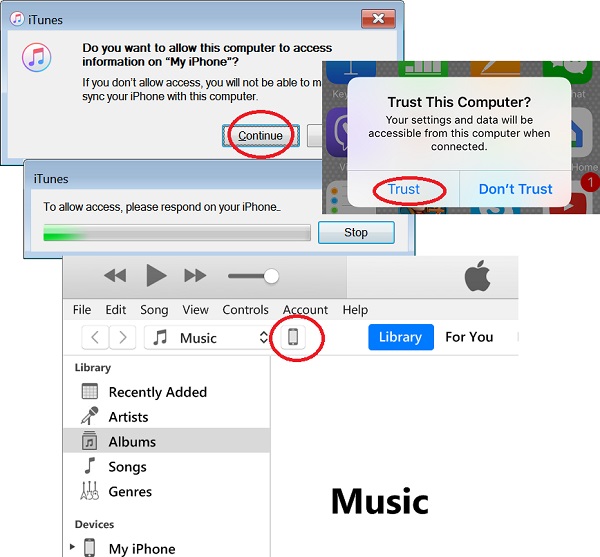
4. Click "Continue", when you see this warning message:
Do you want to allow this computer to access information
on "My iPHone"?

If you don't allow access, you will not be able to manage
or sync your iPhone with this computer.
5. Go back to your iPhone, when you see the next message: "To allow access, please respond on your iPhone".
6. Now on your iPhone, tap on "Trust" on this message:
Trust This Computer?

Your settings and data will be accessible from this computer
when connected.

            [ Trust ]  [ Don't Trust ]
A cellphone icon is displayed in the menu area indicating that your iPhone is connected to iTunes. You can manage your iPhone from iTunes now.
⇒ iPhone Summary Displayed on iTunes on Mac
⇐ Manage iPhone from iTunes on Mac
2020-11-11, ∼2890🔥, 0💬
Related Topics:
