Categories:
Android (32)
Apple (iPhone) (829)
Apps (26)
BlackBerry (3)
General (438)
HTC (6)
Huawei (83)
LG (43)
Motorola (50)
Nokia (4)
Palm (10)
Samsung (163)
Sony (1)
Technology (17)
Windows Phone (209)
ZTE (5)
Online Tools:
Tutorial Collections:
Other Resources:
Add Music Files to iTunes Library on Mac
How to add a single music file to iTunes music library on Mac?
✍: FYIcenter.com
You can follow this tutorial to add a single music file to
iTunes music library.
1. Start iTunes on your Mac computer.
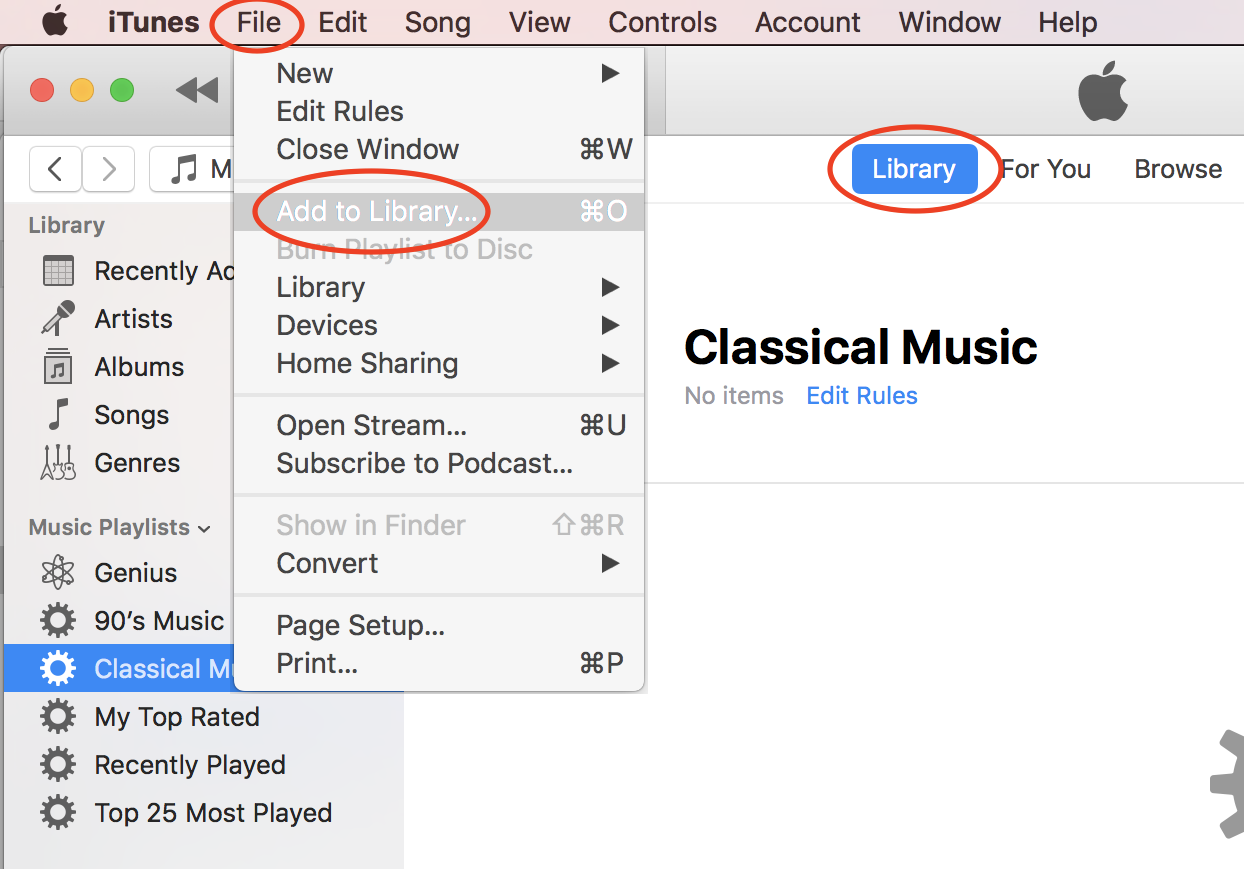
2. Click "File > Add to Library..." in the menu. You see a file browser displayed.
3. Browse the hard disk of your computer to locate the music file.
4. Select the music file and click "Open". The selected file will be added to iTune music library.
⇒ Add Music Folder to iTunes Library on Mac
⇐ Downloaded Free Music from Amazon
2020-10-20, ∼2264🔥, 0💬
Popular Posts:
Why I am getting the "SIM Required" error while trying to activate my iPhone? If you are trying acti...
What are iPhone 5C model numbers? I want to check my iPhone model to ensure I have an iPhone 5C. You...
How to change photo aspect ratio with iPhone Photos app? I want to change my photo to be a square (1...
Where to find answers to frequently asked questions on Apple iPhone? I want to know more details abo...
How a phone screen display size is measured? What does a 5.8 inch (150 mm) phone screen mean? Cell p...