Account Settings in Samsung "Email"
Q
What account settings are available in Samsung "Email"?
✍: FYIcenter.com
A
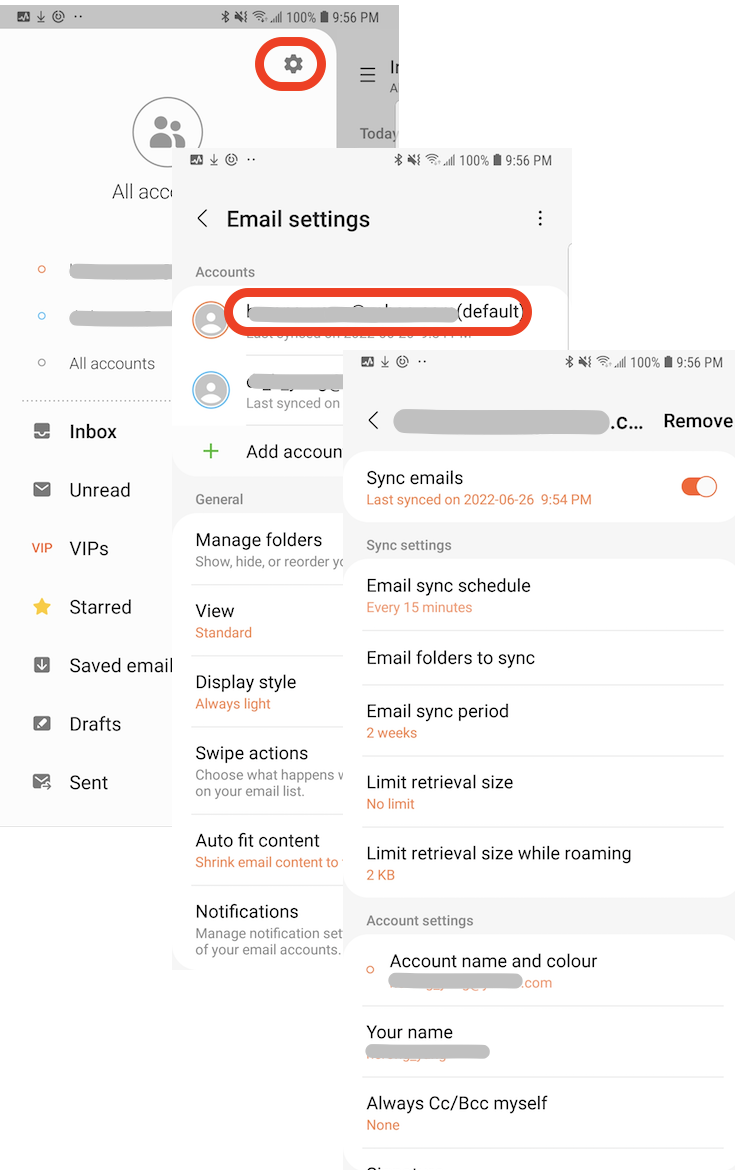
 Samsung "Email" supports a number of account settings
as shown below.
Samsung "Email" supports a number of account settings
as shown below.
1. Tap on "Mail" app to open it. You see a list of email messages from existing email accounts.
2. Tap on menu icon near the top left corner. You see a list of existing email accounts and their email folders.
3. Tap on settings icon near the top-right corner. You see a list of existing email accounts and their shared settings.
4. Tap on one email account. You see settings for this account.
Sync emails: On
Email sync schedules: Every 15 minutes
Email folders to sync: (Select all)
Email sync period: 2 weeks
Limit retrieval size: No limit
Limit retrieval size while roaming: 2 KB
Account name and colour: ***
Your name: ***
Always Cc/Bcc myself: Hone
Signature: Sent from my Galaxy
Show images: On
Auto download attachments: Off
Server settings:
  Server address, port, protocol, etc.
⇒ Using Samsung "My Files" App
2023-02-19, ∼2218🔥, 0💬
Related Topics:


