iOS 9 to 12 Upgrade on iPad over Wi-Fi
Q
Why I am not able to upgrade iOS 9 to iOS 12 on my iPad over Wi-Fi connection?
✍: FYIcenter.com
A
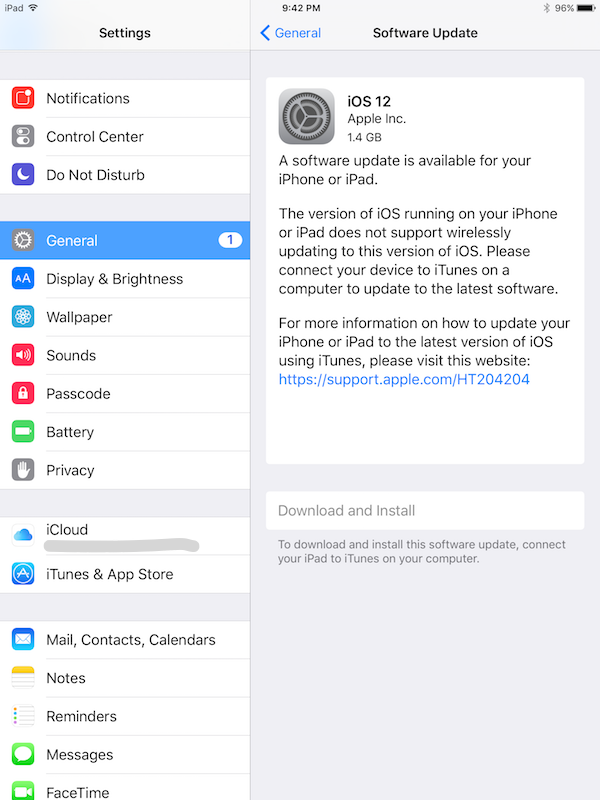
 If you try to upgrade iOS 9 to iOS 12 on your iPad
using "Settings > General > Software Update",
the "Download and Install" button will be greyed out
preventing you to perform the upgrade as shown below.
If you try to upgrade iOS 9 to iOS 12 on your iPad
using "Settings > General > Software Update",
the "Download and Install" button will be greyed out
preventing you to perform the upgrade as shown below.
1. Connect your iPad to the Internet with Wi-Fi. Internet connection over cellular data service is too slow to perform iOS upgrade.
2. Go to "Settings > General > Software Update". You see iOS 12 is available for your iPad. But the "Download and Install" button is greyed out with a notice:
iOS 12

A software update is available for your iPhone or iPad.

The version of iOS running on your iPhone or iPad does
not support wirelessly updating to this version.

Please connect your device to iTunes on a computer
to update to the latest software.

...
⇒ iOS 9 to 12 Upgrade on iPad over iTunes
2025-10-14, ∼1725🔥, 0💬
Related Topics: