Categories:
Android (32)
Apple (iPhone) (829)
Apps (26)
BlackBerry (3)
General (438)
HTC (6)
Huawei (83)
LG (43)
Motorola (50)
Nokia (4)
Palm (10)
Samsung (163)
Sony (1)
Technology (17)
Windows Phone (209)
ZTE (5)
Online Tools:
Tutorial Collections:
Other Resources:
Taking screenshot on iPhone
How to taking screenshot on iPhone and save it as a picture?
✍: FYIcenter.com
Taking screenshot is not that easy. But you can learn it with some practice:
1. Stay on the screen where you want to make it as a picture.
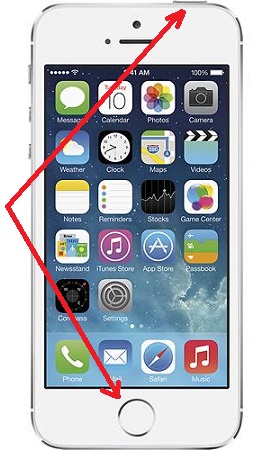
2. Press the Home button and Sleep button at the same time. You will hear the sound of a camera shutter like taking a picture with your iPhone camera.
3. Go to Photos to view the saved screenshot.
The Home button is at the center near the bottom of the screen. and the Sleep button is at the top right of the iPhone.
The picture below shows you the Home button and the Sleep button:
2014-06-12, ∼3436🔥, 0💬
Popular Posts:
What is the Motorola Model Number Hierarchy? Motorola Model Number Hierarchy can be described as: Hi...
How to View Details and Stop a Running Service on Motorola phone? If you want to View Details and St...
When was Gresso Luxor Las Vegas Jackpot phone first released? What was the price tag? How does Gress...
When was Nokia Lumia 1020 phone first released? How does Nokia Lumia 1020 phone look like? What are ...
Where to find IMEI/MEID Numbers for testing purpose? If you are looking for IMEI/MEID numbers to tes...