Categories:
Android (32)
Apple (iPhone) (829)
Apps (26)
BlackBerry (3)
General (438)
HTC (6)
Huawei (83)
LG (43)
Motorola (50)
Nokia (4)
Palm (10)
Samsung (139)
Sony (1)
Technology (17)
Windows Phone (209)
ZTE (5)
Online Tools:
Tutorial Collections:
Other Resources:
Taking screenshot on iPhone
How to taking screenshot on iPhone and save it as a picture?
✍: FYIcenter.com
Taking screenshot is not that easy. But you can learn it with some practice:
1. Stay on the screen where you want to make it as a picture.
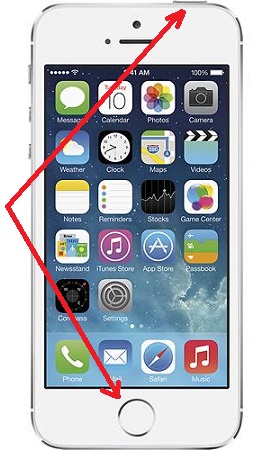
2. Press the Home button and Sleep button at the same time. You will hear the sound of a camera shutter like taking a picture with your iPhone camera.
3. Go to Photos to view the saved screenshot.
The Home button is at the center near the bottom of the screen. and the Sleep button is at the top right of the iPhone.
The picture below shows you the Home button and the Sleep button:
2014-06-12, ∼3198🔥, 0💬
Popular Posts:
What is price of Apple iPhone 4 Diamond Rose Edition designed by Stuart Hughes? The price tag for an...
Where to find answers to frequently asked questions on Apple iPhone? I want to know more details abo...
What icons are used on Samsung Galaxy Phone? Here is a list of commonly used icons on Samsung Galaxy...
Where to find answers to frequently asked questions on LG Phones? I want to know more details about ...
Where to find answers to frequently asked questions on Apple iBooks? I want to know how to download,...