Managing iPhone Contacts with iCloud Control Panel
How to delet or manage iPhone contacts with iCloud Control Panel on my computer? I have iCloud Control Panel installed on my Windows 7 computer.
✍: FYIcenter.com
With iCloud Control Panel installed on Windows 7 computer, you can delete or manage your iPhone contacts from your computer:
1. Connect your iPhone to your Windows computer with the USB cable.
2. Click Start button, then "All Programs > iCloud > Contacts". Your iPhone contacts are listed in a Web browser.
3. Scroll down to locate the contact you want to delete and click on the contact name. The contact details shows up on the right side
4. Click on "Edit" at the top. The editing screen shows up.
5. Scroll to the end. The "Delete Contact" option shows up.
6. Click on "Delete Contact". Then "Delete" again to confirm.
7. To delete multiple contacts, you need to select multiple contacts while holding down the <Ctrl> key. Selected contacts show up on the right side.
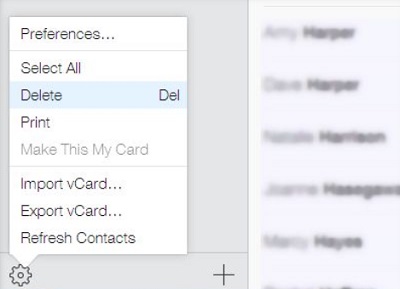
8. Click on the Action icon near the bottom left corner. The action menu shows up.
9. Click "Delete" from the menu. Then "Delete" again to confirm.
The picture below shows you the iCloud delete multiple contacts command:
2014-06-09, ∼3416🔥, 0💬
Related Topics: