Categories:
Android (32)
Apple (iPhone) (829)
Apps (26)
BlackBerry (3)
General (438)
HTC (6)
Huawei (83)
LG (43)
Motorola (50)
Nokia (4)
Palm (10)
Samsung (163)
Sony (1)
Technology (17)
Windows Phone (209)
ZTE (5)
Online Tools:
Tutorial Collections:
Other Resources:
Creating an iCloud Account from iPhone
How to register an iCloud account from my iPhone?
✍: FYIcenter.com
Creating an iCloud account from your iPhone requires these steps:
1. Tap on "Settings" on the Home screen.
2. Scroll down and tap "iCloud".
3. Sign in with your Apple ID, if you have one. Or tap "Get a Free Apple ID" register a new one.
Wait until your iPhone to finish setting up iCloud.
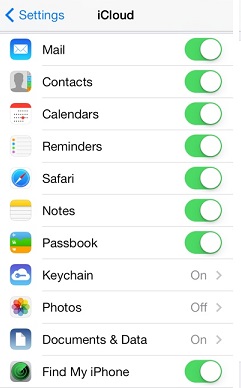
You will see the iCloud settings as shown below at the end:
2014-06-11, ∼3546🔥, 0💬
Popular Posts:
How to check and decode SIM Card Number? To help you to obtain detailed information from the SIM (Su...
What Information Is Stored on a SIM Card? A SIM (Subscriber Identity Module) card has a data storage...
How to use Wi-Fi Wireless Debugging connection from Motorola phone to computer? The Wireless Debuggi...
When was HTC Evo 4G LTE phone first released? How does HTC Evo 4G LTE phone look like? What are the ...
Who are the biggest mobile phone makes in the world in 2013? Here are the top 10 biggest mobile phon...