Manage Trusted Devices for Apple ID with Web Browser
How to manage trusted devices for Apple ID with a Web browser on my computer? I want to remove my old iPhone as the trusted device.
✍: FYIcenter.com
 If you want to manage your trusted devices in your Apple ID account
with a Web browser on your computer,
you can follow these steps:
If you want to manage your trusted devices in your Apple ID account
with a Web browser on your computer,
you can follow these steps:
1. Open a Web browser on your computer and go to http://appleid.apple.com.
2. Enter your Apple ID and password. Then click the arrow to sign in.
3. Get the verification code from your current trusted device, and enter it to finish the sign in process. You see your Apple ID account information.
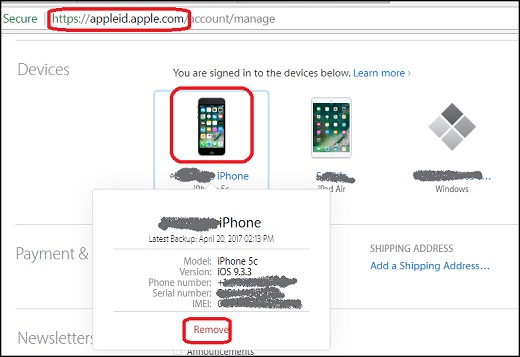
4. Go to the Devices section. You see a list of trusted devices in your Apple ID.
5. Click on your old iPhone device to view the model, serial number, and other useful information. You also see the "Remove" link displayed.
6. Click the "Remove" link to remove your old iPhone from the trusted device list. It will no longer be used to display verification codes. Access to iCloud, and other Apple services on your old iPhone will also be blocked until you sign in again with two-factor authentication from your old iPhone.
The following picture shows you steps to manage trusted devices in your Apple ID account with a Web browser on your computer:
⇒ Manage Trusted Phone Numbers for Apple ID with Web Browser
⇐ Verify Two-Factor Authentication with Web Browser
2017-09-20, ≈17🔥, 0💬

