iTunes Media Folder Settings on Mac
Q
What are settings related to the iTunes Media Folder on Mac?
✍: FYIcenter.com
A
 This tutorial shows you how to view and change the iTunes Media Folder settings:
1. Start iTunes on your computer.
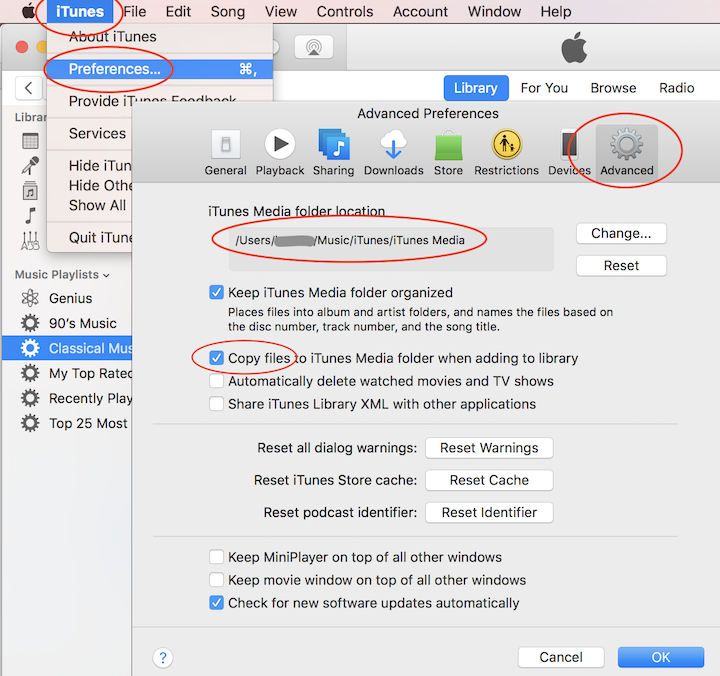
2. Click "iTunes > Preferences..." in the menu. You see the preference screen.
3. Click "Advanced" tab. You see iTunes Media Folder related settings:
iTunes Media Folder location:
   \Users\fyicenter\Music\iTunes\iTunes Media

[x] Keep iTunes Media folder organized
[x] Copy files to iTunes Media folder when adding to library
[ ] Share iTuens Library XML with other application
...
4. Make sure to check "Copy files to iTunes Media folder when adding to library" option. This will keep the music file in the library even the original music file is no longer there.
5. Click "OK" to save changes.
⇒ Record Music with QuickTime Player on Mac
⇐ Replace (Sync) Music Files from iTunes to iPhone
2020-10-20, ∼2633🔥, 0💬
Related Topics:
