Installing iCloud Control Panel on Windows 7
How to download and install iCloud Control Panel on my Windows computer? I heard it share documents with my computer.
✍: FYIcenter.com
Yes, iCloud Control Panel can help you to share your documents from your computer with your iPhone or iPad through iCloud. Follow these steps to install it:
1. Go to the iCloud Control Panel website
2. Click the "Download" button and save the installation file, iCloudSetup.exe, to a temporary folder. The file is about 67 MB. The download may take a few minutes.
3. Double-click on iCloudSetup.exe start the installation. And follow installation instructions to finish.
4. Restart your Windows computer. You will see the iCloud login screen.
6. Login to your iCloud account.
7. If your iPhone is connected, you will see this message on the iPhone:
Trust This Computer?
Your settings and data will be accessible from this computer
when connected.
8. Tap "Trust" on the iPhone to allow you to access your iPhone from your computer.
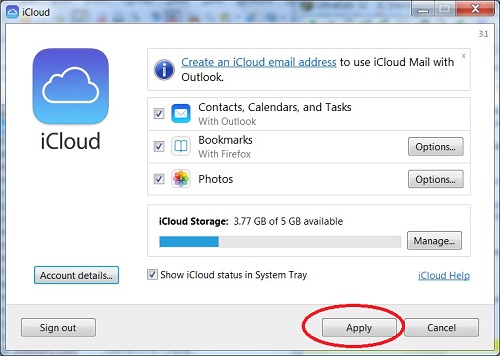
9. Back on the computer, the iCloud settings screen is displayed.
10. Click the "Apply" button. Finish the settings.
iCloud Control Panel is ready to use on your Windows computer.
The picture below shows you the iCloud Control Panel settings
2014-05-22, ∼3503🔥, 0💬
Related Topics: