iPhone Camera Exposure and Focus Locking
How to lock exposure time and focus distance settings on my iPhone Camera?
✍: FYIcenter.com
 You can use the AE/AF Lock function on your iPhone camera
to lock exposure time and focus distance settings, so that
you take multiple photos with the same settings.
You can use the AE/AF Lock function on your iPhone camera
to lock exposure time and focus distance settings, so that
you take multiple photos with the same settings.
Setting and locking exposure time and focus distance settings in advance also speed up the time required to capture good photos of fast passing subjects.
Steps below describes how to use the AE/AF Lock function on your iPhone camera.
1. Hold your iPhone camera still.
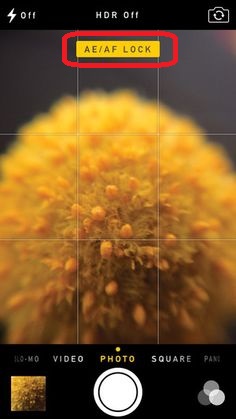
2. Tap and hold on the spot where you want the camera to have a sharp focus on it. You see the yellow text "AE/AF LOCK" on top of the screen, the focus spot box and the exposure adjustment icon on the tapped area.
3. Swipe the screen up to move exposure icon up to increase exposure time. Or swipe the screen down to move exposure icon up to decrease exposure time.
4. Don't touch the screen anymore, when you get the perfect focus and exposure settings.
5. Wait for the subject to show up and press the shutter to take photos.
6. Touch anywhere on the screen to release the AE/AF lock.
The picture below shows you how to use the AE/AF lock on your iPhone camera (source: pinterest.com):
⇒ Using Camera Digital Zoom on iPhone
2017-09-01, ∼3598🔥, 0💬
Related Topics:

