LG Nexus 4 Phone Released in 2012
When was LG Nexus 4 phone first released? How does LG Nexus 4 phone look like? What are the main technical specifications of LG Nexus 4 phone?
✍: FYIcenter.com
The LG Nexus 4 phone was released in November 2012 running Android OS.
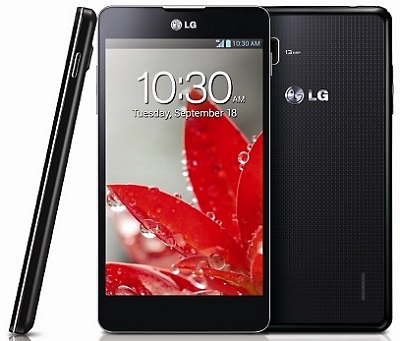
The following picture shows how a LG Nexus 4 phone looks like:
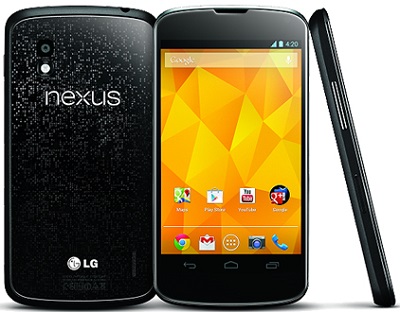
The LG Nexus 4 was designed and manufactured by LG in partnership with Google. The LG Nexus 4 phone is equipped with a 1.5 GHz quad-core Snapdragon S4 Pro processor, 2 GB of RAM, 8 or 16 GB of internal storage, front facing 1.3 megapixel camera and an 8 megapixel rear camera and a micro-SIM card tray.
Main specifications of LG Nexus 4 phone:
Manufacturer       LG
First released     November 13, 2012
Dimensions         133.9 x 68.7 x 9.1 mm (5.27 x 2.70 x 0.36 in)
Weight             139 g (4.9 oz)
Operating system   Android 4.2.2 Jelly Bean
SoC                Qualcomm Snapdragon S4 Pro APQ8064
CPU                1.5 GHz quad-core Krait
GPU                Adreno 320
Memory             2 GB RAM
Storage            8/16 GB
Battery            3.8 V 2100 mAh, 8 Wh, Talk time 15 hours
Display            4.7 in (120 mm), 1280×768 px (316 ppi)
Rear camera        8 MP, 1080p video recording @ 30 frames/s
Front camera       1.3 MP, 720p video recording @ 30 frames/s
Connectivity       GPS, USB, NFC, WiFi, Bluetooth,
⇒ LG Phone - Frequently Asked Questions
2024-02-05, ∼7490🔥, 1💬
Related Topics: