Categories:
Android (32)
Apple (iPhone) (829)
Apps (26)
BlackBerry (3)
General (438)
HTC (6)
Huawei (83)
LG (43)
Motorola (50)
Nokia (4)
Palm (10)
Samsung (139)
Sony (1)
Technology (17)
Windows Phone (209)
ZTE (5)
Online Tools:
Tutorial Collections:
Other Resources:
Taking screenshot on iPhone
How to taking screenshot on iPhone and save it as a picture?
✍: FYIcenter.com
Taking screenshot is not that easy. But you can learn it with some practice:
1. Stay on the screen where you want to make it as a picture.
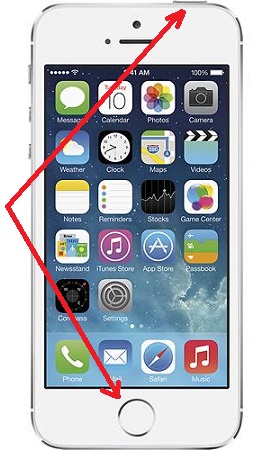
2. Press the Home button and Sleep button at the same time. You will hear the sound of a camera shutter like taking a picture with your iPhone camera.
3. Go to Photos to view the saved screenshot.
The Home button is at the center near the bottom of the screen. and the Sleep button is at the top right of the iPhone.
The picture below shows you the Home button and the Sleep button:
2014-06-12, ∼3004🔥, 0💬
Popular Posts:
Where to find answers to Samsung phone related issues? Here is a list of Samsung phone related issue...
What is the format of *.AAE Files for iPhone Pictures? The format of *.AAE files iPhone pictures is ...
What are phone number formats useed in a specific country or region? Different countries or regions ...
How to View Details and Stop a Running Service on Motorola phone? If you want to View Details and St...
What information are available on the "Settings > General > About" screen on my iPhone...