Two-Factor Authentication Login Example
How to complete the Two-Factor Authentication process when log in to my iCloud account in a Web browser?
✍: FYIcenter.com
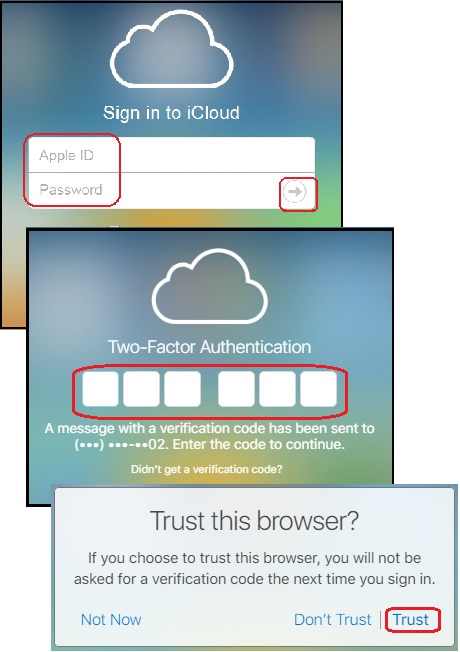
 Here is an example of login to iCloud account in a Web browser
with the Two-Factor Authentication process.
Here is an example of login to iCloud account in a Web browser
with the Two-Factor Authentication process.
1. Open a Web browser and go to https://www.icloud.com. You see the login page showing up.
2. Enter your Apple ID and password. Then click the arrow at the end of the password line. You see the Two-Factor Authentication prompt. It displays 6 empty boxes for you to enter the 6-digit verification code.
It also gives the following message on where the verification code was sent:
A message with a verification code has been sent to
your devices. Enter the code to Continue.
[Resend code]
[Can't get to your device?]
It may gives the following message if you have no connected Apple devices.
A message with a verification code has been sent to
(***) ***-**82 (the first trusted phone in your account).
Enter the code to Continue.
[Don't get a verification code?]
3. Go to your Apple device, you should see a pop message asking you give permission for this login, followed by a verification code.
Or go to your cell phone with the phone number ending with "82". You should get a new text message from Apple with the a verification code.
4. Come back to the Web browser and enter the verification code. You see the "Trust this browser" message:
Trust this browser?

If you choose to trust this browser, you will not be
asked for a verification code the next time you sign in.
5. Click "Trust". You see your iCloud home page with a list of services.
If you are not able to get the verification code on your Apple device or the trusted phone, go to back to the Web browser, and click the "Can't get to your device?", or "Didn't get a verification code?" link. Apple will give you options to resend the verification code.
⇒ Online Applications Provided on iCloud.com
2025-07-03, ∼2434🔥, 0💬
Related Topics:


