Purchaser of App on iPad
How to identify the purchaser of an app on my iPad?
✍: FYIcenter.com
 All apps you downloaded (paid or free) from App Store
are tagged with your Apple ID as the "Purchaser".
All apps you downloaded (paid or free) from App Store
are tagged with your Apple ID as the "Purchaser".
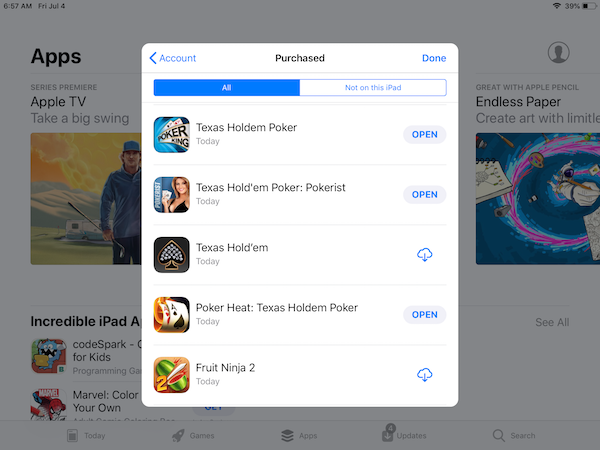
You can view all apps you have "purchased" in App Store by follow these steps.
1. Tap on "App Store".
2. Tap on the profile icon at the top right corner. Enter your Apple ID and password, if prompted. You see your profile settings in App Store.
3. Tap on "Purchased". You see a list of Apps you have purchased on all Apple devices.
4. If a purchased app is installed on this iPad, you see a "Open" button to launch it.
5. If a purchased app is not installed on this iPad, you see a "Download" icon to install it.
⇒ Manage Apps not Purchased by You on iPad
2026-03-22, ∼1506🔥, 0💬
Related Topics:


