Categories:
Android (32)
Apple (iPhone) (829)
Apps (26)
BlackBerry (3)
General (438)
HTC (6)
Huawei (83)
LG (43)
Motorola (50)
Nokia (4)
Palm (10)
Samsung (163)
Sony (1)
Technology (17)
Windows Phone (209)
ZTE (5)
Online Tools:
Tutorial Collections:
Other Resources:
Creating an iCloud Account from iPhone
How to register an iCloud account from my iPhone?
✍: FYIcenter.com
Creating an iCloud account from your iPhone requires these steps:
1. Tap on "Settings" on the Home screen.
2. Scroll down and tap "iCloud".
3. Sign in with your Apple ID, if you have one. Or tap "Get a Free Apple ID" register a new one.
Wait until your iPhone to finish setting up iCloud.
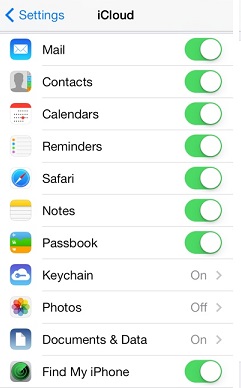
You will see the iCloud settings as shown below at the end:
2014-06-11, ∼3560🔥, 0💬
Popular Posts:
How much does the iPhone 6 / iPhone 6 Plus weigh? The new iPhone 6 and even the larger iPhone 6 Plus...
When was Apple iPhone 5 first released? How does Apple iPhone 5 look like? What are the main technic...
iPhone -Contacts - How can I add a custom label to iPhone contact numbers? The iPhone Contacts app p...
How to transfer personal apps and data from my old iPhone to my new iPhone? I want all settings, app...
How to access iCloud for Windows from the System Tray? After you started iCloud for Windows on your ...