Autodialing Phone Extension with Pause on iPhone
How to add an extension number to a phone number for autodialing on my iPhone? I tired of remembering and dialing Mike's office extension number manually, each time calling him.
✍: FYIcenter.com
 Let's assume that Mike works in a company that has one incoming phone
number, 987 654 3210, for every one in the office building.
To reach Mike's office phone, you need to dail the extension, 1234.
Let's assume that Mike works in a company that has one incoming phone
number, 987 654 3210, for every one in the office building.
To reach Mike's office phone, you need to dail the extension, 1234.
If you just store Mike's company phone number without his extension number in the contact directory on your iPhone. you have to dial it manually, after his company phone system says "Please enter extension you want to reach now." This is very annoying.
If you store Mike's company phone number and his extension number together, 987 654 3210 1234, in the contact directory. you iPhone will dial them all together as a single number. Your phone company to reject call, because it's an invalid phone number.
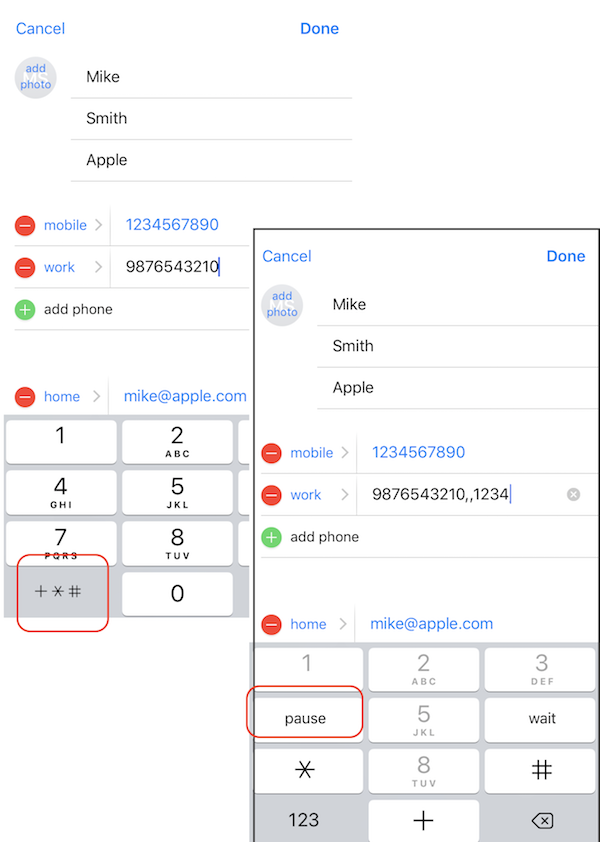
To solve the problem, iPhone supports a "pause" signal using a comma "," in the autodialing sequence. A single comma "," pauses the dialing for 3 seconds. You can use two commas ",," to pause for 6 seconds to let Mike's company phone system to finish their greeting voice message.
So here are the correct steps to add an extension number to a phone number for autodialing on your iPhone.
2. Tap on "Contacts". You see the phone contact directory.
3. Scroll done to find and the contact "Mike Smith".
4. Tap on "Mike Smith". You see his contact details displayed.
5. Tap on "Edit". You see the contact edit form.
4. Update the work number to be "9876543210,,1234". Remember to switch the keypad by tapping "+$#" to enter "pause", which becomes comma "," in the phone number sequence.
7. Tap on "Done" to save changes.
Try it now. It should work.
The picture below shows you how to add an extension number to a phone number for autodialing on your iPhone:
⇒ Using Messages App on iPhone
2020-04-30, ∼2718🔥, 0💬
Related Topics:

