Send File over Bluetooth - Galaxy to Mac Failed
Why am I getting the "sending failed" error, when sending files over Bluetooth from my Samsung Galaxy to my Mac computer?
✍: FYIcenter.com
 You may get the the "sending failed" error,
with the default Bluetooth settings on your Samsung Galaxy and Mac computer.
You may get the the "sending failed" error,
with the default Bluetooth settings on your Samsung Galaxy and Mac computer.
1. Create a Bluetooth connection between your Samsung Galaxy and your Mac computer as described in previous tutorials.
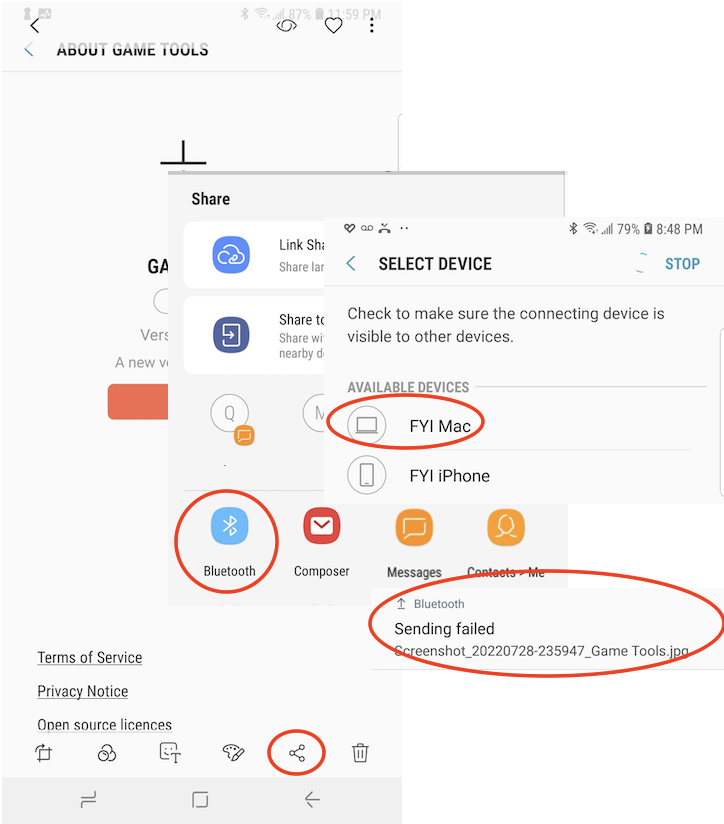
2. On your Galaxy, open a picture in "Gallery" and tap on the "Share" icon. You see a list of share options.
3. Scroll down to find and tap "Bluetooth". You see a list of paired (connected) devices.
4. Select your Mac computer name (FYI Mac). Galaxy will try to send the picture file and return an error message:
Sending failed

{picture file name}.jpg
The picture below shows you steps to send files over Bluetooth from your Samsung Galaxy to your Mac computer:
See next tutorial on how to fix the "Sending failed" error.
⇒ Send File over Bluetooth - Troubleshoot
⇐ Send File over Bluetooth - Mac to Galaxy
2022-11-04, ∼1980🔥, 0💬
Related Topics:
 USE PHONE NUMBER TO GET IMEI
I’m trying to get a IMEI number using a telephone number how do I do that can you help me? 2022-12-03, ∼3122🔥, 1💬
Unlock
How can I unlock my phone from TracFone? 2023-01-23, ∼2223🔥, 1💬
💬 2023-01-23 FYIcenter.com: You can call TracFone support desk. They will unlock it for you.
