Connect Samsung Galaxy with Bluetooth Earbud
How to connect my Samsung Galaxy with my Bluetooth Earbud?
✍: FYIcenter.com
 Here are the correct steps to connect your Samsung Galaxy with your Bluetooth Earbud.
1. Disconnect and un-pair your Bluetooth Earbud from any other devices. This is done by open the other device Bluetooth settings, open the paired Earbud name and tap remove. This is a required step. If not done, your Earbud will not be able to connect to any other device, since it is limited to 1 connected device only.
2. Charge the Earbud first.
3. Then take the Earbud out of the case and placed in your ear. You should hear a message like: "Ready to pair", or "Pairing mode".
4. On your Samsung Galaxy, go to "Settings > Connections > Bluetooth".
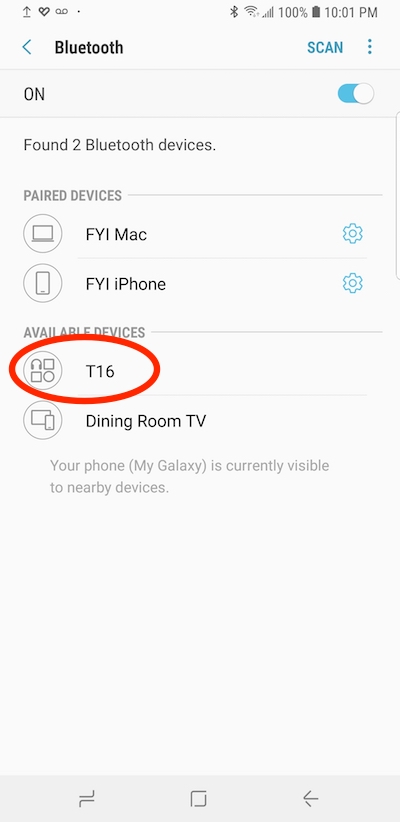
5. Turn the "Bluetooth" switch on. Your Samsung Galaxy will discover your Earbud and listed it under AVAILABLE DEVICES. This may take a few seconds.
6. The name of your Earbud is defaulted differently by different vendors, for example: T16. Tap on the name to pair it.
7. Once it is paired, you can listen music, or making phone calls, using the earbud.
8. Put the earbud back to the case, it will be disconnected, but stay paired with your Galaxy.
9. Put the earbud in your ear again, it will be automatically connected and ready to use.
⇒ Using Samsung "Internet" App
⇐ Send File over Bluetooth - Troubleshoot
2022-11-04, ∼2162🔥, 0💬
Related Topics:
 USE PHONE NUMBER TO GET IMEI
I’m trying to get a IMEI number using a telephone number how do I do that can you help me? 2022-12-03, ∼3313🔥, 1💬


Unlock
How can I unlock my phone from TracFone? 2023-01-23, ∼2352🔥, 1💬
💬 2023-01-23 FYIcenter.com: You can call TracFone support desk. They will unlock it for you.