Import Photos/Videos from iPhone to macOS
Hoe to import photos and videos from my iPhone to my macOS computer? My iPhone storage is full. I want to save some photos on my computer.
✍: FYIcenter.com
 The fastest way to import photos and videos from your iPhone to your macOS computer
is to connect your iPhone to your macOS computer and use Photos app
as shown below:
The fastest way to import photos and videos from your iPhone to your macOS computer
is to connect your iPhone to your macOS computer and use Photos app
as shown below:
1. Connect your iPhone with your macOS computer with a USB cable.
2. Start "Photos" app on your macOS computer. You see a phone icon showing up in the "import" section on the left menu with your iPhone name.
3. Click on your iPhone name. You see a message box saying "Please unlock phone_name", where phone_name should be your iPhone name.
4. Unlock your iPhone with your passcode or fingerprint. You see a list of photos and videos from your iPhone showing up on the screen.
5. Select any photos or videos and click "Import Selected".
Selected items will be imported to your macOS computer.
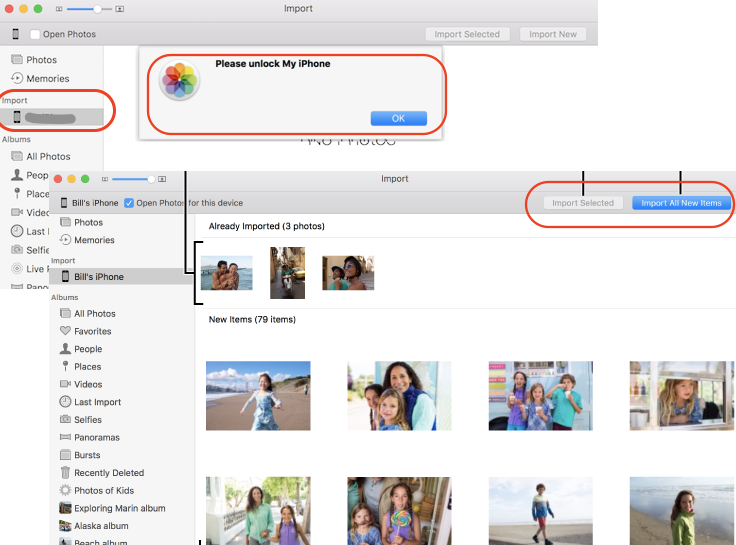
Imported photos appear in the Last Import album under Albums in the sidebar. You can select the imported photos and add them to a new album or project. The imported photos also appear among your other moments and collections in your library.
Disconnect your iPhone and view your imported photos. If imported photos are ok. You can delete them from your iPhone.
2023-06-11, ∼1563🔥, 0💬
Related Topics:
 USE PHONE NUMBER TO GET IMEI
I’m trying to get a IMEI number using a telephone number how do I do that can you help me? 2022-12-03, ∼2647🔥, 1💬

Unlock
How can I unlock my phone from TracFone? 2023-01-23, ∼1871🔥, 1💬
💬 2023-01-23 FYIcenter.com: You can call TracFone support desk. They will unlock it for you.