Sign in Required when Updating Apps
Why "Sign In" is required when updating apps, even my Apple ID is already entered in App Store?
✍: FYIcenter.com
 When you try to update an app that was not purchased by you
App Store will prompt you to enter the password of
the original purchaser's Apple ID.
This is to prevent a purchased app get installed and used
by multiple users.
When you try to update an app that was not purchased by you
App Store will prompt you to enter the password of
the original purchaser's Apple ID.
This is to prevent a purchased app get installed and used
by multiple users.
For example, you give your used iPad to a friend to use and left a game app on the iPad.
Your friend enters his/her Apple ID in settings/App Store, and start to use it.
The game app not be listed on the home screen. So he/she can not play the game.
Your friend goes to the App Store, and sees the game app is listed as "Installed" with an "Update" button.
Your friend taps the "Update" button. App Store displays the following prompt:
Sign In to the iTunes Store
If you have an Apple Account, sign in with it here.
[___Password___]

[Cancel] [Download]
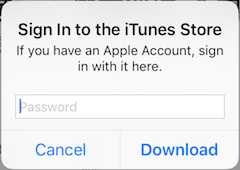
The prompt is somewhat misleading. iTunes Store has nothing to do this request. The Apple ID of the original purchaser is hidden for security reasons. But you are requested to enter the password of original purchaser.
So in order for your friend to play this game on the iPad, he/she has to delete it by going to "Settings > General > iPad Storage", and download/install it again in App Store with his/her Apple ID.
2026-03-22, ∼1679🔥, 0💬
Related Topics:

