Manage iPhone Excel Files with iTunes on Windows
How to manage iPhone Excel files with iTunes for Windows? I am using Microsoft Excel app on my iPhone.
✍: FYIcenter.com
 If you are using Microsoft Excel app on my iPhone,
you can use iTunes for Windows to manage Excel files on your iPhone.
If you are using Microsoft Excel app on my iPhone,
you can use iTunes for Windows to manage Excel files on your iPhone.
1. Connect your iPhone to iTunes as shown in the previous tutorial.
2. Click on the smart phone icon in the menu area. You see the summary information about your iPhone.
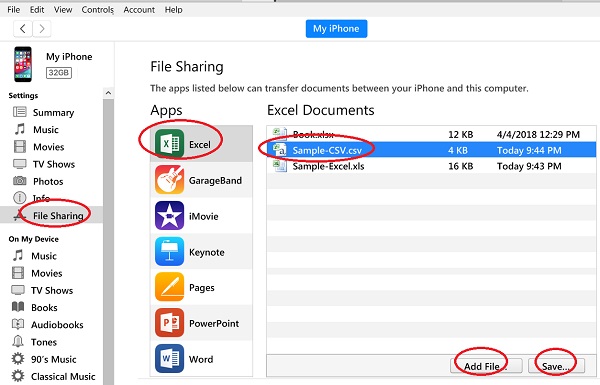
3. Click "File Sharing" in the left menu. You see a list of iPhone apps that can exchange files with your computer.
4. Click "Excel" from the apps list. You see a list Excel files stored on your iPhone.
Now you can:
- Transfer an Excel file from iPhone to computer by selecting the file and clicking the "Save" button.
- Transfer an Excel file from computer to iPhone by clicking the "Add File" button and select an Excel file.
- Rename an Excel file from iPhone by double-clicking the file name and entering a new name.
- Delete an Excel file from iPhone by selecting the file and pressing the "Delete" key.
⇒ Manage iPhone PowerPoint Files with iTunes on Windows
⇐ Restore iPhone Backups from iTunes on Windows
2020-12-26, ∼2395🔥, 0💬
Related Topics:
