Top Level Setting Options on iPhone
Q
What are top level setting options on my iPhone?
✍: FYIcenter.com
A
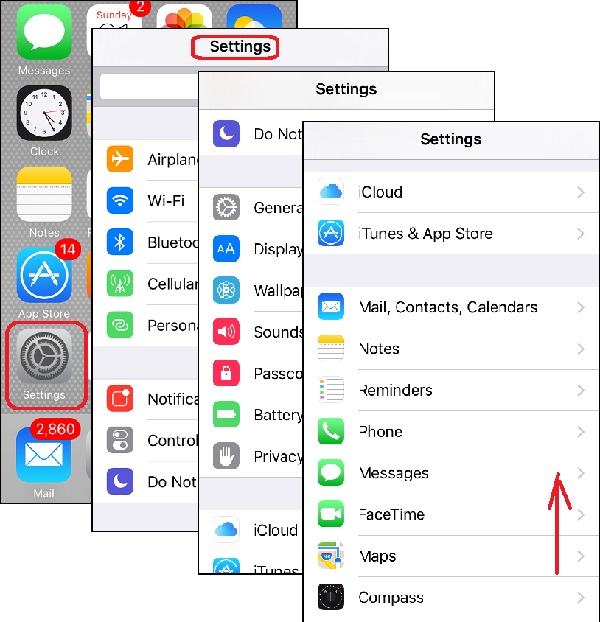
 Here is how to see the top level setting options on your iPhone:
1. Tap on "Settings" icon on the home screen.
2. Swipe up and down. You see a list of all top level setting options on the screen.
iPhone settings are groups into the following categories:
Commonly used settings:
- Airplane Mode - To turn off all wireless communications while in a airplane.
- Wi-Fi - To connect to Wi-Fi routers in the near by area.
- Bluetooth - To connect to bluetooth devices in the near by area.
- Cellular - To connect to cellular towers.
- Personal Hotspot - To turn iPhone into a router to provide Internet service other devices.
- Notifications - To control how apps can send notifications to your iPhone.
- Control Center - To control the behavior of the Control Center on your iPhone. Control Center is accessible by swiping up the buttom of the screen.
- Do Not Disturb - To mute sound on your iPhone.
iPhone device settings:
- General - To manage general settings for your iPhone device.
- Display & Brightness - To manage screen settings.
- Wallpaper - To manage background image of the home screen.
- Sounds - To manage sound settings.
- Passcode - To manage passcode to lock down the home screen.
- Battery - To manage battery settings.
- Privacy - To manage privacy settings, like allowing apps to access your location and other private data.
Apple apps settings:
- iCloud - To manage settings for iCloud services.
- iTunes & App Store - To manage settings for iTunes & App Store apps.
- Mail, Contacts, Calendars - To manage settings for Mail, Contacts, & Calendars apps.
- Notes - To manage settings for Notes app.
- Reminders - To manage settings for Reminders app.
- Phone - To manage settings for Phone app.
- Messages - To manage settings for Messages app.
- FaceTime - To manage settings for FaceTime app.
- Maps - To manage settings for Maps app.
- Compass - To manage settings for Compass app.
- Safari - To manage settings for Safari app.
- News - To manage settings for News app.
- Music - To manage settings for Music app.
- Videos - To manage settings for Videos app.
- Photos & Camera - To manage settings for Photos & Camera apps.
- iBooks - To manage settings for iBooks app.
- Podcasts - To manage settings for Podcasts app.
- Game Center - To manage settings for Game Center app.
3rd party apps settings:
- Twitter - To manage settings for Twitter app.
- Facebook - To manage settings for Facebook app.
- Flickr - To manage settings for Flickr app.
- And many more...
The picture below shows you the top level setting options on your iPhone:
2017-06-11, ∼4403🔥, 0💬
Related Topics:


💬 2023-04-01 Tilman Blakely: Neither I phone or I pad will allow m to make donations
💬 2023-02-27 Maria Tjimuhiva: I want to remove FaceTime and iMessage on iPhone desktop