Categories:
Android (32)
Apple (iPhone) (829)
Apps (26)
BlackBerry (3)
General (438)
HTC (6)
Huawei (83)
LG (43)
Motorola (50)
Nokia (4)
Palm (10)
Samsung (139)
Sony (1)
Technology (17)
Windows Phone (209)
ZTE (5)
Online Tools:
Tutorial Collections:
Other Resources:
Open and Read Books on iBooks
How to open and read books on iBooks? I have purchased some books from the book store.
✍: FYIcenter.com
You can follow this tutorial to open and read books on iBooks.
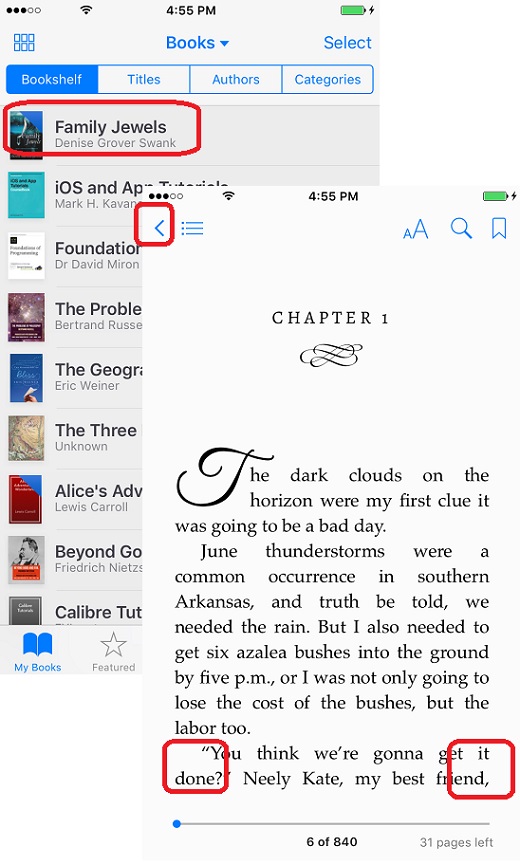
1. Launch iBooks on your iPhone. You see your book library list.
2. Tap on the book you want to open to read. You see the book opening up.
3. Tap on the right side of the screen to go to the next page.
4. Tap on the left side of the screen to go to the previous page.
5. Tap on "<" icon to quit reading.
The picture below shows you how to open and read books on iBooks:
2018-06-12, ∼2651🔥, 0💬
Popular Posts:
Why I am getting the "SIM Required" error while trying to activate my iPhone? If you are trying acti...
How much does the iPhone 6 / iPhone 6 Plus weigh? The new iPhone 6 and even the larger iPhone 6 Plus...
Where to find answers to frequently asked questions about Phone Identification Numbers? Here is a li...
Where to find IMEI/MEID Numbers for testing purpose? If you are looking for IMEI/MEID numbers to tes...
What is the format of *.AAE Files for iPhone Pictures? The format of *.AAE files iPhone pictures is ...