iPhone Music Downloaded Music
What is the best way to manage Downloaded music files on iPhone?
✍: FYIcenter.com
 There are 2 ways to store downloaded music files on your iPhone.
1. iPhone Files - iPhone Files allows you to:
- Store music and other files received from Email, AirDrop, or other Apps.
- Play music from stored music files.
- Sync music and other files with iCloud Drive and other cloud storage service.
2. iPhone Music - iPhone Music allows you to:
- Store music files imported, (called Downloaded Music) with iTunes.
- Store local copies of purchased music from iTunes store.
- Play music from stored music files.
The following diagram shows you different ways
to transfer downloaded music files between iPhone and Windows/Man computers:
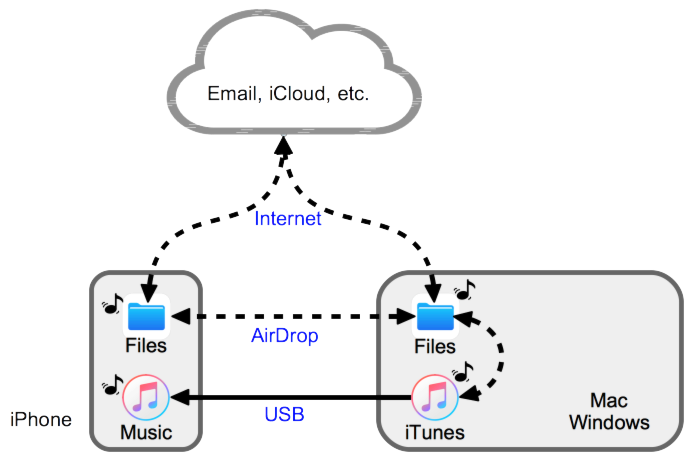
As you can see from the diagram:
- iPhone does not allow you to store downloaded music files (like *.pm3 files) directly to iPhone Music library. This is to help protecting music digital copyright.
- You can easily save music files in iPhone Files frome email, from iCloud Drive/Microsoft OneDrive/etc., from Website downloads, or from AirDrop transfers.
- You can play music from iPhone Files. But that player is too simple comparing to iPhone Music.
- The only way to transfer music files to iPhone Music is to use iTunes from a desktop computer with a USB connection.
- Transerring music files to iPhone Music is a one-way street. There is no way to transfer them back. So you must keep copies of your music files on your desktop computer.
- The best place to keep your downloaded music files is iCloud Drive. You can get them anytime, anywhere and on any device with a simple Web browser.
To turn on iCloud Drive on your iPhone, tap "Settings > Apple ID > iCloud > iCloud Drive: ON".
To access iCloud Drive files, tap "Files > Locations > iCloud Drive".
See other tutorials on how to transfer music files with iTunes on desktop computers.
⇒ Record Music with Voice Memos on iPhone
2021-03-21, ∼2840🔥, 0💬
Related Topics:

