Categories:
Android (32)
Apple (iPhone) (829)
Apps (26)
BlackBerry (3)
General (438)
HTC (6)
Huawei (83)
LG (43)
Motorola (50)
Nokia (4)
Palm (10)
Samsung (139)
Sony (1)
Technology (17)
Windows Phone (209)
ZTE (5)
Online Tools:
Tutorial Collections:
Other Resources:
Add Music Files to iTunes Library on Mac
How to add a single music file to iTunes music library on Mac?
✍: FYIcenter.com
You can follow this tutorial to add a single music file to
iTunes music library.
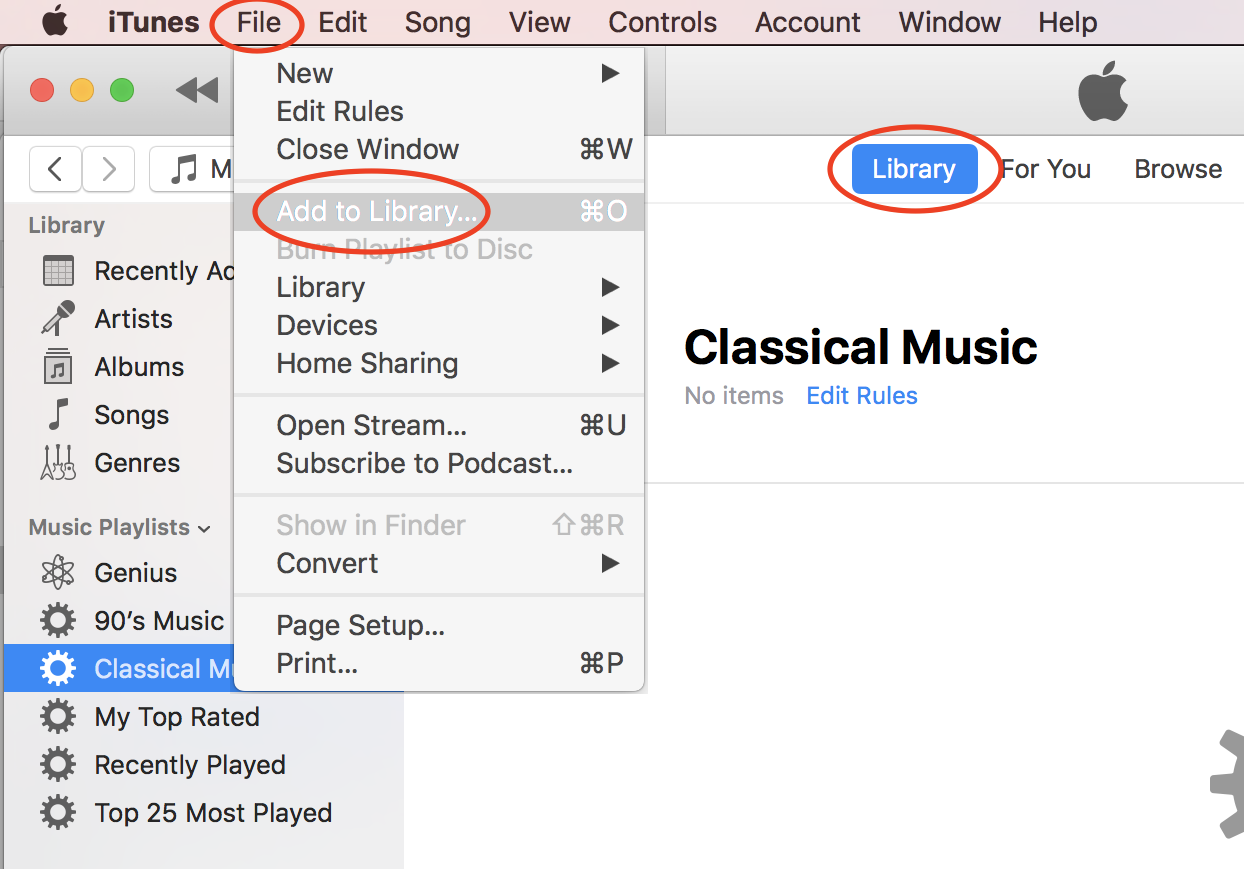
1. Start iTunes on your Mac computer.
2. Click "File > Add to Library..." in the menu. You see a file browser displayed.
3. Browse the hard disk of your computer to locate the music file.
4. Select the music file and click "Open". The selected file will be added to iTune music library.
⇒ Add Music Folder to iTunes Library on Mac
⇐ Downloaded Free Music from Amazon
2020-10-20, ∼1817🔥, 0💬
Popular Posts:
What is the Slate style cell phone? A Slate style cell phone is usually with few hardware buttons an...
Where is the location of my Galaxy phone backup crated by Smart Switch on my Mac computer? Once you ...
How to manage trusted devices for Apple ID with a Web browser on my computer? I want to remove my ol...
How much does the iPhone 6 / iPhone 6 Plus weigh? The new iPhone 6 and even the larger iPhone 6 Plus...
What is the "Hello" screen on my Apple iPhone? It displays the "Hello" message in multiple languages...