Differentiate iMessage and MMS/SMS on iPhone
How to differentiate iMessage and MMS/SMS messages on iPhone? What are the differences?
✍: FYIcenter.com
 The "Messages" app on your iPhones uses two types of messages:
iMessage and Text (MMS/SMS).
Here are the differences:
The "Messages" app on your iPhones uses two types of messages:
iMessage and Text (MMS/SMS).
Here are the differences:
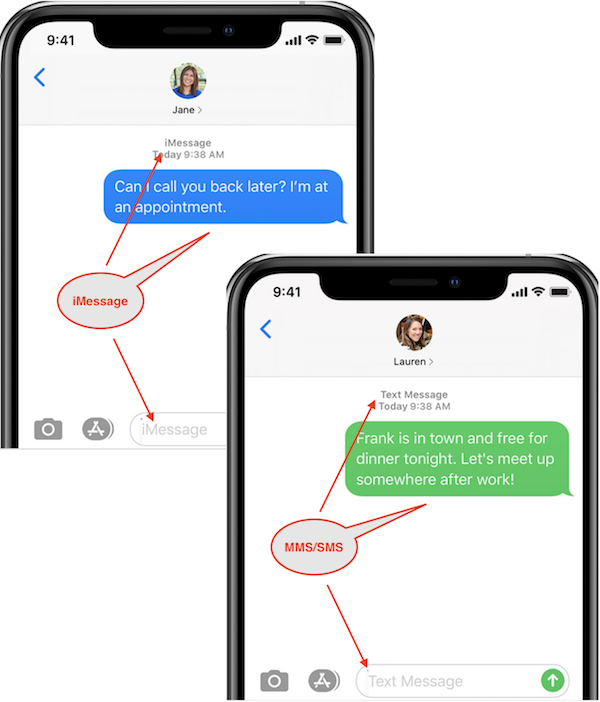
1. iMessage messages show up in blue text bubbles on the screen.
2. Text (MMS/SMS) messages show up in green text bubbles on the screen.
3. The input box shows "iMessage" when sending iMessage messages.
4. The input box shows "Text Message" when sending Text (MMS/SMS) messages.
5. iMessage messages are delivered with Internet connections.
6. Text (MMS/SMS) messages are delivered with Text services from wireless carrier.
7. iMessage messages exchanged with iPhone and Apple devices only.
8. Text (MMS/SMS) messages exchanged with all types of cellphones.
The picture below shows you the difference of iMessage and Text messages on your iPhone:
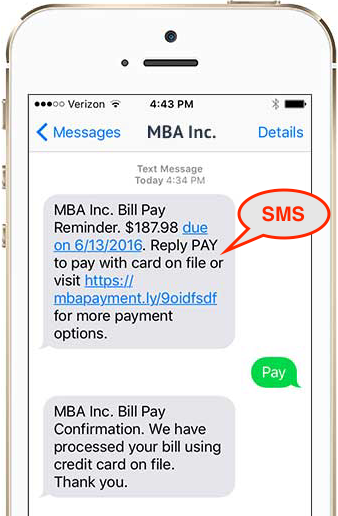
The picture below shows you a Messages screen confirming a payment with SMS technology on iPhone:
⇐ Turn On/Off SMS Function on iPhone
2021-02-16, ∼3415🔥, 0💬
Related Topics:

