Categories:
Android (32)
Apple (iPhone) (829)
Apps (26)
BlackBerry (3)
General (438)
HTC (6)
Huawei (83)
LG (43)
Motorola (50)
Nokia (4)
Palm (10)
Samsung (139)
Sony (1)
Technology (17)
Windows Phone (209)
ZTE (5)
Online Tools:
Tutorial Collections:
Other Resources:
Creating an iCloud Account from iPhone
How to register an iCloud account from my iPhone?
✍: FYIcenter.com
Creating an iCloud account from your iPhone requires these steps:
1. Tap on "Settings" on the Home screen.
2. Scroll down and tap "iCloud".
3. Sign in with your Apple ID, if you have one. Or tap "Get a Free Apple ID" register a new one.
Wait until your iPhone to finish setting up iCloud.
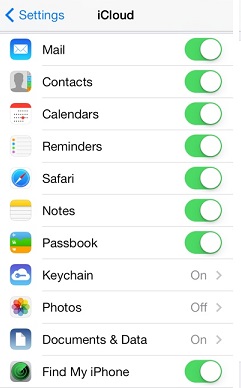
You will see the iCloud settings as shown below at the end:
2014-06-11, ∼3223🔥, 0💬
Popular Posts:
What are background services created by System UI? Can I stop them to improve performance of my Moto...
When was Samsung Galaxy S III phone first released? How does Samsung Galaxy S III phone look like? W...
How to set Up a Samsung Galaxy - Samsung Account? Samsung Account Create a new, or sign in to an exi...
When was Nokia Lumia 920 phone first released? How does Nokia Lumia 920 phone look like? What are th...
What is price of the most expensive Apple iPhone 5? The most expensive Apple iPhone 5 is the one cre...