Apply for Apple ID on appleid.apple.com
How to apply for Apple ID with Web browser? I need an Apple ID to use iCloud to backup my photos.
✍: FYIcenter.com
 If want to use an iPhone, you have to apply for
Apple ID following these steps:
If want to use an iPhone, you have to apply for
Apple ID following these steps:
1. Run a Web browser and go to https://appleid.apple.com/.
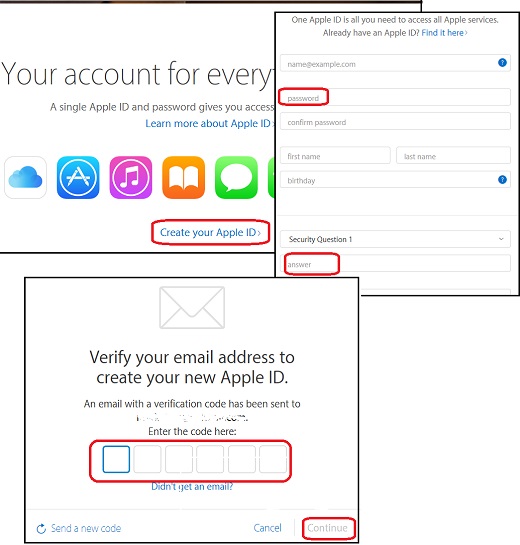
2. Click the "Create an Apple ID" button near the bottom of the Web page.
3. Fill in the application form.
4. Write done your password, security questions and answers on paper. If you forget your password, you recover it with security questions. But if you forget your security questions and answers, there is no way to reset them.
5. Finish the application process.
6. Go to your email box which you used in the application and look for the email verification message from Apple.
7. Finish the application process with the verification code from the email.
The picture below shows you the main steps of applying Apple ID on appleid.apple.com:
⇒ Get Apple ID on iTunes without Credit Card
2023-04-18, ≈15🔥, 4💬
Related Topics:

💬 2023-04-18 Aswanth: Creat my apple id
💬 2023-02-24 Usman: Dear apple team i need an apple id to use iCloud to backup my poto
💬 2023-02-24 Usman: Dear apple team my apple I'd have not creat please create my apple I'd