Install Wi-Fi Enabled Printer on Android
Q
How to install Wi-Fi Enabled Printer on my Android phone?
✍: Guest
A
 If you have a Wi-Fi Enabled Printer on your local network,
you can follow this tutorial to install it on your Android phone.
If you have a Wi-Fi Enabled Printer on your local network,
you can follow this tutorial to install it on your Android phone.
1. Connect your Android phone with Wi-Fi to your local network.
2. Tap and open "Settings" from home screen.
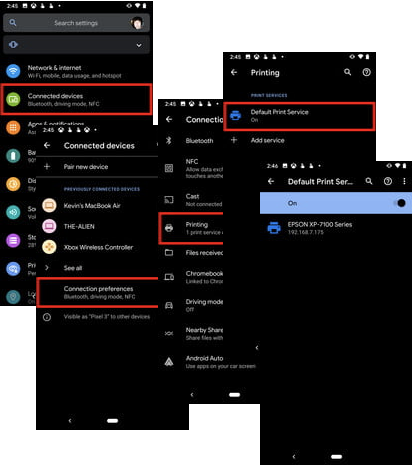
3. Tap "Connected Devices > Connection Preferences > Printing". You see "Default Print Service" switch, a list of existing printers, and "Add service" option.
4. Turn on "Default Print Service". Your phone detects the Wi-Fi Enabled printer.
5. Select a Wi-Fi Enabled printer to make it as the default printer.
2021-08-21, ∼2503🔥, 0💬
Related Topics: