Smart Search Photos in Library on macOS
How to perform smart search on photos and videos on my macOS computer? I have a large collection of photos and it's not easy to find a specific photo.
✍: FYIcenter.com
 You can use the search function in Photos app to find photos by keywords
of locations, dates, people names, categories, backgrounds, objects, memories, projects, albums or folders.
You can use the search function in Photos app to find photos by keywords
of locations, dates, people names, categories, backgrounds, objects, memories, projects, albums or folders.
1. Open "Photos" in the left menu. You a list of all photos and videos sorted by dates.
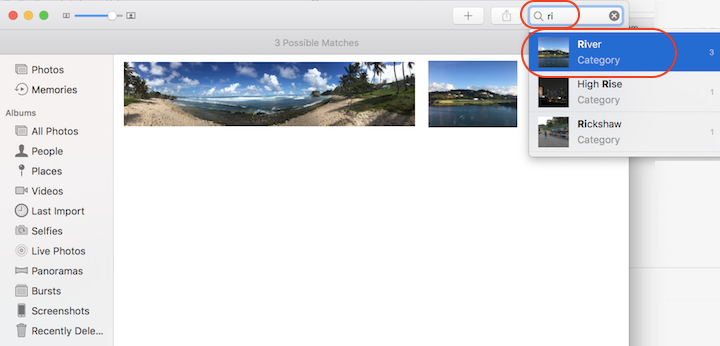
2. Enter partial word like "ri" in the search box. You see list of search suggestions with matches provided to you.
3. Select "River - Category" from the suggestion list. You see 3 photos related to "River" listed.
Note "Photos" may make mistakes and decides to show you ocean waters as rivers!
⇒ Find and Identify People in Photos on macOS
2023-05-31, ∼2646🔥, 0💬
Related Topics:
