Backup iPhone Settings and Data to iCloud
How to backup my iPhone Settings and data to iCloud? I want to be able restore my iPhone settings if needed.
✍: FYIcenter.com
 Backup your iPhone settings and data to iCloud is good idea.
This will be a big help if you crewed up your iPhone settings
and need to restore the settings.
Backup your iPhone settings and data to iCloud is good idea.
This will be a big help if you crewed up your iPhone settings
and need to restore the settings.
You easily backup the entire data from your iPhone to iCloud by following these steps:
1. Make sure your iPhone is connected to the Internet with Wi-Fi. iPhone backup requires a large amount of data transfer and it could be costly if you use cellular data connection.
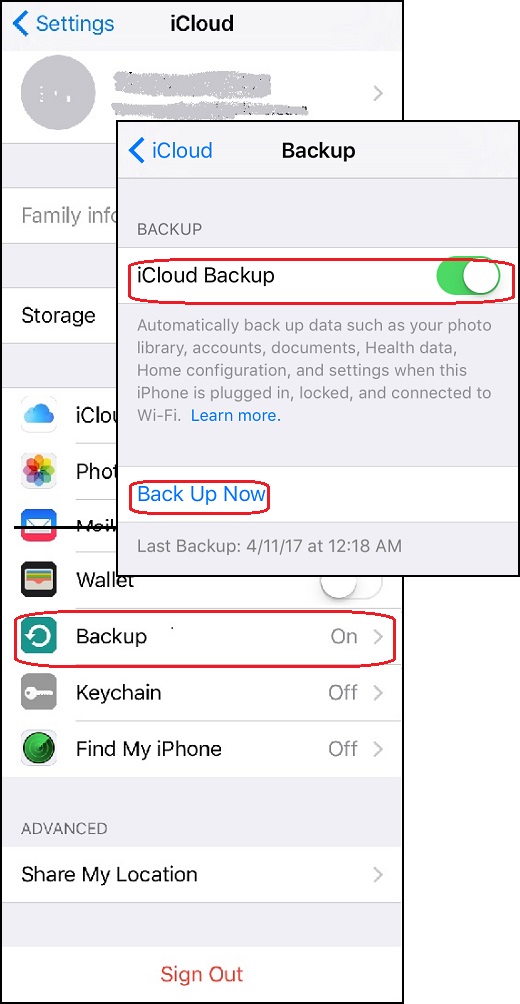
2. Go to "Settings > iCloud". You see a list of iCloud functions.
3. Scroll down and tap on "Backup" switch to turn it on. You see the backup screen showing up.
4. Tap on "iCloud Backup" switch to turn it on. It will automatically back up data such as your photo library, accounts, documents, health data, home configuration, and settings when this iPhone is plugged in, locked, and connected to Wi-Fi.
Basically, it will backup your entire phone when are you at home sleeping in the night.
5. If you want to do the backup immediately, tap on "Back Up Now".
The picture below shows you how to backup your iPhone settings and data to iCloud:
⇒ Setup iCloud Keychain Service from iPhone
2017-05-12, ∼2876🔥, 0💬
Related Topics: